<?xml version="1.0" encoding="utf-8"?>
<feed xmlns="http://www.w3.org/2005/Atom">
    <id>https://www.skratchdot.com/</id>
    <title>skratchdot</title>
    <updated>2016-01-27T00:00:00.000Z</updated>
    <generator>https://github.com/skratchdot/skratchdot.com/blob/master/_build/feeds.js</generator>
    <author>
        <name>skratchdot</name>
        <email>jeff@skratchdot.com</email>
        <uri>https://www.skratchdot.com/</uri>
    </author>
    <link rel="alternate" href="https://www.skratchdot.com/"/>
    <link rel="self" href="https://www.skratchdot.com/atom.xml"/>
    <subtitle>The skratchdot.com feed</subtitle>
    <logo>https://www.skratchdot.com/images/logo.png</logo>
    <icon>https://www.skratchdot.com/favicon.ico</icon>
    <rights>Copyright © 2026 skratchdot</rights>
    <entry>
        <title type="html"><![CDATA[Creating Virtual MIDI Ports On OSX for WebMidi]]></title>
        <id>https://www.skratchdot.com/2016/01/creating-virtual-midi-ports-on-osx</id>
        <link href="https://www.skratchdot.com/2016/01/creating-virtual-midi-ports-on-osx"/>
        <updated>2016-01-27T00:00:00.000Z</updated>
        <content type="html"><![CDATA[<h2>Introduction</h2>
<p><a href="http://webaudio.github.io/web-midi-api/">WebMidi</a> is a technology that has been
emerging for a few years now, and it&#39;s finally supported in Chrome by default.
Even browsers that don&#39;t support it can use the
<a href="https://github.com/cwilso/WebMIDIAPIShim">WebMIDIAPIShim</a>
by <a href="https://github.com/cwilso/">Chris Wilson</a> to add support. For a list of
current support, check out <a href="http://caniuse.com/#feat=midi">caniuse.com</a>.</p>
<p>If you are not a musician or audio hobbyist, you might not have any midi
devices setup, and will not be able to get the full experience on websites that
are starting to enable midi features.</p>
<p>Fear not, you can setup virtual midi devices that can be used on these websites.
There are ways to do this on all operating systems. This tutorial is focused
on OSX, but Window users can check out tools like
<a href="http://www.midiox.com/myoke.htm">Midi Yoke</a>,
<a href="http://www.nerds.de/en/loopbe1.html">LoopBe1</a>,
<a href="http://www.sonycreativesoftware.com/dl/dl.aspx?dwnid=77">Sony Virtual MIDI Router</a>,
or <a href="http://www.tobias-erichsen.de/software/loopmidi.html">loopMIDI</a>
and Linux users can try
<a href="http://www.alsa-project.org/main/index.php/Main_Page">ALSA</a>
or <a href="http://qjackctl.sourceforge.net/">QJackCtl</a>.</p>
<h2>Creating Virtual MIDI Ports On OSX</h2>
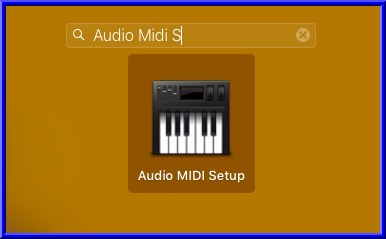
<h4>Step 1: Open <strong>Audio MIDI Setup</strong></h4>
<p>You can open <strong>Audio MIDI Setup</strong> by searching Spotlight, by looking in
<strong>/Applications/Utilities/</strong>, or by using Launchpad:</p>
<p><img src="https://www.skratchdot.com/images/posts/2016/01/27/launchpad.png" alt="Launchpad"></p>
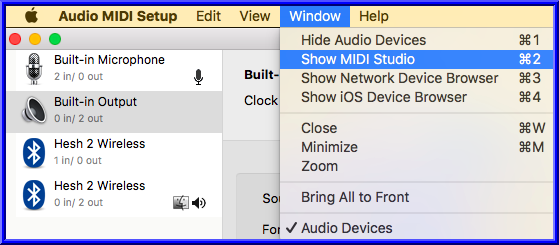
<h4>Step 2: Show <strong>MIDI Studio</strong></h4>
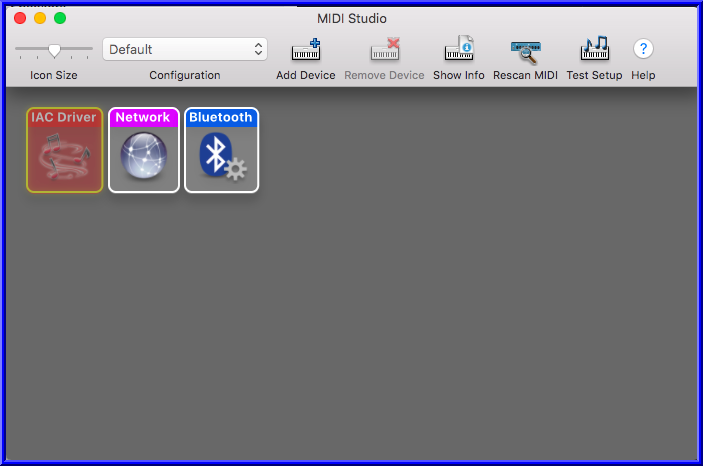
<p>Once <strong>Audio MIDI Setup</strong> is open, you can open the <strong>Midi Studio</strong> window:</p>
<p><img src="https://www.skratchdot.com/images/posts/2016/01/27/midi-studio.png" alt="Midi Studio"></p>
<h4>Step 3: Open <strong>IAC Driver</strong></h4>
<p>Now you can open <strong>IAC Driver (Inter Application Communications Driver)</strong> by
double clicking on the icon:</p>
<p><img src="https://www.skratchdot.com/images/posts/2016/01/27/iac-driver.png" alt="IAC Driver"></p>
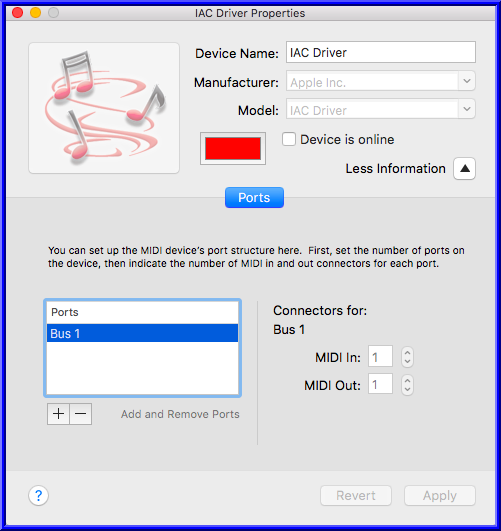
<p>Which opens this window:</p>
<p><img src="https://www.skratchdot.com/images/posts/2016/01/27/iac-driver-window.png" alt="IAC Driver Window"></p>
<h4>Step 4: Add Virtual Port</h4>
<ul>
<li>Click the &quot;Add and Remove Ports Button&quot;</li>
<li>A new port called &quot;IAC Bus 2&quot; will be added.</li>
<li>Rename the port to &quot;WebMidi&quot; by clicking on the port you want to rename</li>
<li><strong>IMPORTANT:</strong> Make sure to check the &quot;Device is online&quot; box at the top.</li>
</ul>
<p>After making the following changes you should see:</p>
<p><img src="https://www.skratchdot.com/images/posts/2016/01/27/iac-driver-finished.png" alt="IAC Driver Finished"></p>
<p>Now that you have your virtual driver / port setup, you can install / use a
virtual MIDI keyboard on your favorite WebMidi enabled website. For
instructions on installing a Virtual MIDI Keyboard, continue reading below.</p>
<h2>Install / Use a Virtual MIDI Keyboard</h2>
<p>A few options:</p>
<ul>
<li><a href="http://vmpk.sourceforge.net/">Virtual MIDI Piano Keyboard</a></li>
<li><a href="http://www.manyetas.com/creed/midikeys.html">Midi Keys</a></li>
</ul>
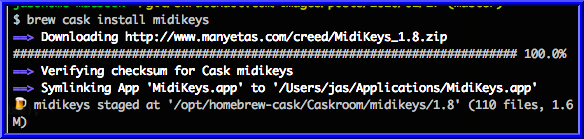
<p>Since I use <a href="http://brew.sh/">homebrew</a> with <a href="http://caskroom.io/">cask</a>,
I&#39;m going to install midikeys. You can do this by opening your command line,
and running:</p>
<pre><code class="language-bash">brew cask install midikeys
</code></pre>
<p><img src="https://www.skratchdot.com/images/posts/2016/01/27/midikeys-install.png" alt="MidiKeys - Install"></p>
<p>Now that MidiKeys is installed, you can open it via Launchpad:</p>
<p><img src="https://www.skratchdot.com/images/posts/2016/01/27/midikeys-launchpad.png" alt="MidiKeys - Launchpad"></p>
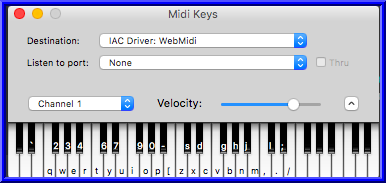
<p>Once the program is opened, make sure to choose &quot;IAC Drive: WebMidi&quot; from the
&quot;Destination&quot; dropdown:</p>
<p><img src="https://www.skratchdot.com/images/posts/2016/01/27/midikeys-usage.png" alt="MidiKeys - Usage"></p>
<p>You can now click on keys from that virtual keyboard to send MIDI events to the
WebMidi virtual port you created earlier.</p>
<p>There are other options for virtual keyboards / software, but this is a quick way
to get up and running. More advanced users can try out programs like
<a href="https://puredata.info/">Pure Data</a> by running</p>
<pre><code class="language-bash">brew cask install pd
</code></pre>
<p>and creating their own virtual midi keyboard / instrument for usage with WebMidi.</p>
<p>Better yet, create your own WebMidi instrument that sends output to other
WebMidi enabled devices!</p>
]]></content>
        <author>
            <name>skratchdot</name>
            <email>jeff@skratchdot.com</email>
            <uri>https://www.skratchdot.com/</uri>
        </author>
        <contributor>
            <name>skratchdot</name>
            <email>jeff@skratchdot.com</email>
            <uri>https://www.skratchdot.com/</uri>
        </contributor>
    </entry>
    <entry>
        <title type="html"><![CDATA[Audio Grid - Web-Based Audio Tool]]></title>
        <id>https://www.skratchdot.com/2013/08/audio-grid-web-based-audio-tool</id>
        <link href="https://www.skratchdot.com/2013/08/audio-grid-web-based-audio-tool"/>
        <updated>2013-08-25T00:00:00.000Z</updated>
        <content type="html"><![CDATA[<p>A few years ago I saw the great <a href="http://tonematrix.audiotool.com/">Tone Matrix</a> tool by
<a href="http://andre-michelle.com/">Andre Michelle</a>. It&#39;s a flash based audio experiment that
let&#39;s you highlight items in a matrix to create music.</p>
<p>With newer browsers, you are finally able to implement some of the things you could do in
flash years ago, without requiring browser plugins. I created
<a href="http://projects.skratchdot.com/audio-grid/index.html">Audio Grid</a> as an experiment to explore
this fact.</p>
<p>It&#39;s using <a href="http://mohayonao.github.io/timbre.js/">timbre.js</a> for it&#39;s core functionality, but
is also making use of a few libraries that I recently created for use in
<a href="/projects/audio-sort/">Audio Sort</a>:</p>
<ul>
<li><p><a href="https://github.com/skratchdot/soundfont2mp3">soundfont2mp3</a> - a command line utility that lets
you extract single note mp3s from soundfont files.</p>
</li>
<li><p><a href="https://github.com/skratchdot/timbre.soundfont.js">timbre.soundfont.js</a> - play soundfont urls
using timbre.js</p>
</li>
<li><p><a href="https://github.com/skratchdot/timbre.mp3_decode.js">timbre.mp3_decode.js</a> - a timbre.js plugin
that decodes mp3s using jsmad</p>
</li>
<li><p><a href="https://code.google.com/p/free-midi/">free-midi</a> - a collection of mp3s generated by
<a href="https://github.com/skratchdot/soundfont2mp3">soundfont2mp3</a> and the
<a href="http://www.schristiancollins.com/generaluser.php">S. Christian Collins GeneralUser GS Soundfont</a>.</p>
</li>
</ul>
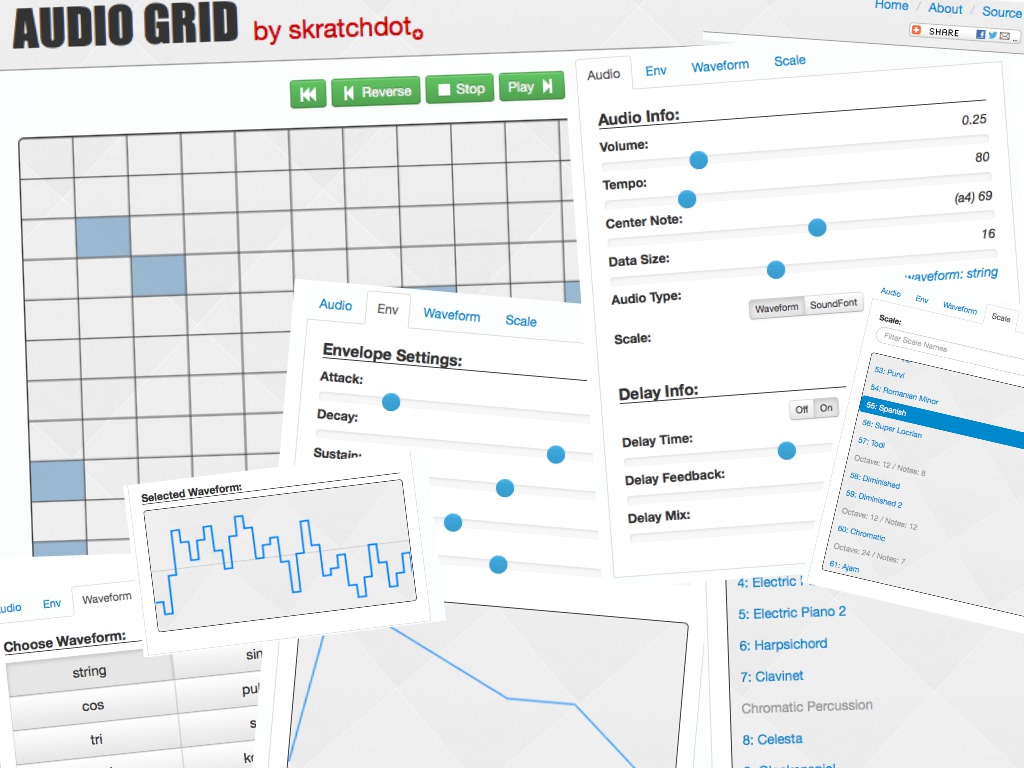
<p>You can see a demo of <a href="">Audio Grid</a> by clicking on the image below:</p>
<p><a href="http://projects.skratchdot.com/audio-grid/index.html"><img src="http://projects.skratchdot.com/audio-grid/img/preview.jpg" alt="Audio Grid"></a></p>
]]></content>
        <author>
            <name>skratchdot</name>
            <email>jeff@skratchdot.com</email>
            <uri>https://www.skratchdot.com/</uri>
        </author>
        <contributor>
            <name>skratchdot</name>
            <email>jeff@skratchdot.com</email>
            <uri>https://www.skratchdot.com/</uri>
        </contributor>
    </entry>
    <entry>
        <title type="html"><![CDATA[Audio Sort - Visualize and Audibilize Sorting Algorithms]]></title>
        <id>https://www.skratchdot.com/2013/07/audio-sort-visualize-and-audibilize-sorting-algorithms</id>
        <link href="https://www.skratchdot.com/2013/07/audio-sort-visualize-and-audibilize-sorting-algorithms"/>
        <updated>2013-07-15T00:00:00.000Z</updated>
        <content type="html"><![CDATA[<p>A few weeks ago I saw a <a href="http://www.youtube.com/watch?v=t8g-iYGHpEA">video on youtube</a> that
showed what different sorting algorithms look (and sound) like as they are executing.</p>
<p>Since I&#39;ve been playing with <a href="http://mohayonao.github.io/timbre.js/">timbre.js</a> lately,
I started to wonder if I could make a web app to accomplish something similar (using javascript
and <a href="https://github.com/skratchdot/audio-sort/#built-with">modern web libraries</a>).</p>
<p>I also wanted to attempt to make the audio &quot;sound good&quot;.</p>
<p>I came up with something fairly quickly, but then started researching websites that provided
similar functionality. The more I researched, the more features I wanted to add. Check
the <a href="https://github.com/skratchdot/audio-sort/#see-also--credits">long list of links</a>
I researched while working on <a href="http://projects.skratchdot.com/audio-sort/index.html">Audio Sort</a>.</p>
<p>I plan to <a href="https://github.com/skratchdot/audio-sort/blob/gh-pages/TODO.md">add more features</a>
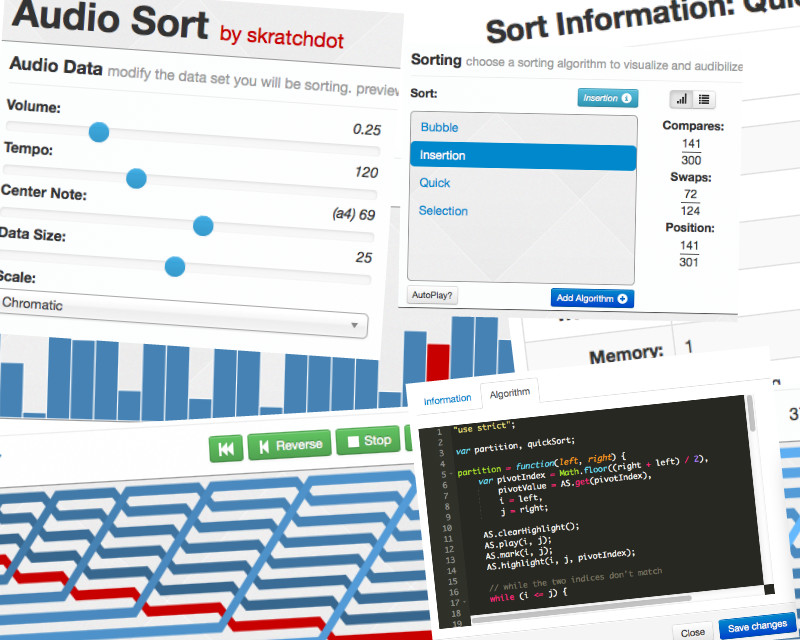
depending on how bored I get. Check out <a href="http://projects.skratchdot.com/audio-sort/index.html">Audio Sort</a>
below:</p>
<p><a href="http://projects.skratchdot.com/audio-sort/index.html"><img src="http://projects.skratchdot.com/audio-sort/img/preview.jpg" alt="Audio Sort"></a></p>
]]></content>
        <author>
            <name>skratchdot</name>
            <email>jeff@skratchdot.com</email>
            <uri>https://www.skratchdot.com/</uri>
        </author>
        <contributor>
            <name>skratchdot</name>
            <email>jeff@skratchdot.com</email>
            <uri>https://www.skratchdot.com/</uri>
        </contributor>
    </entry>
    <entry>
        <title type="html"><![CDATA[Userscripts and Content Security Policy]]></title>
        <id>https://www.skratchdot.com/2013/05/userscripts-and-content-security-policy</id>
        <link href="https://www.skratchdot.com/2013/05/userscripts-and-content-security-policy"/>
        <updated>2013-05-19T00:00:00.000Z</updated>
        <content type="html"><![CDATA[<p>Last month, Github started to include some
<a href="https://en.wikipedia.org/wiki/Content_Security_Policy">Content Security Policy Headers</a>.</p>
<p>They wrote a <a href="https://github.com/blog/1477-content-security-policy">blog post</a> describing
the problems CSP headers try to solve, how to prepare your app for including the headers,
and listed some of the current limitations you may encounter when using the headers.</p>
<p>I&#39;ve ran into some of these limitations with the Github userscripts I&#39;ve authored.</p>
<p>First off, to make a cross browser userscript, there are a few problems that I&#39;ve ran into.
If your userscript needs to access variables on a page, you can use a few techniques:</p>
<ul>
<li><a href="http://wiki.greasespot.net/UnsafeWindow">Unsafe Window</a></li>
<li><a href="http://wiki.greasespot.net/Location_hack">Location Hack</a></li>
<li><a href="http://wiki.greasespot.net/Content_Script_Injection">Content Script Injection</a></li>
</ul>
<p>Of these three, <strong>Content Script Injection</strong> is the preferred method. It works for both
Firefox and Chrome. I&#39;ve been using a variation of that method for most of the scripts I&#39;ve
written in the past.</p>
<p>Here&#39;s how I would typically write my scripts:</p>
<pre><code class="language-javascript">// Create some js that you want to inject into the page
var main = function () {};

// Inject our main script into the page
var script = document.createElement(&#39;script&#39;);
script.textContent = &#39;(&#39; + main.toString() + &#39;)();&#39;;
document.body.appendChild(script);
</code></pre>
<p>After Github started sending CSP headers, my userscripts broke by throwing errors like:</p>
<pre><code>CSP ERROR:  Couldn&#39;t parse invalid source &#39;unsafe-inline&#39;
</code></pre>
<p>To fix Firefox, I temporarily removed the <strong>Content Script Injection</strong> hacks I was using. Here&#39;s
an example commit I made back in April:</p>
<p><a href="https://github.com/skratchdot/github-repo-counts.user.js/commit/80f77bc3d588ef5fcd411a3dc77062166b091713">https://github.com/skratchdot/github-repo-counts.user.js/commit/80f77bc3d588ef5fcd411a3dc77062166b091713</a></p>
<p>What I forgot when making those commits, is that Chrome userscripts do not work the same way as
Firefox userscripts.</p>
<p>To make Chrome userscripts work, I <em>needed</em> to use <strong>Content Script Injection</strong>. The issue is that
Github is sending the following CSP headers:</p>
<pre><code>x-content-security-policy: default-src *; script-src https://github.com https://a248.e.akamai.net https://jobs.github.com https://ssl.google-analytics.com https://secure.gaug.es https://collector.githubapp.com https://gist.github.com; style-src https://github.com https://a248.e.akamai.net &#39;unsafe-inline&#39;; object-src https://github.com https://a248.e.akamai.net
</code></pre>
<p>If you notice, I can only use the <strong>Content Script Injection</strong> method from the following domains:</p>
<ul>
<li><a href="https://github.com">https://github.com</a></li>
<li><a href="https://a248.e.akamai.net">https://a248.e.akamai.net</a></li>
<li><a href="https://jobs.github.com">https://jobs.github.com</a></li>
<li><a href="https://ssl.google-analytics.com">https://ssl.google-analytics.com</a></li>
<li><a href="https://secure.gaug.es">https://secure.gaug.es</a></li>
<li><a href="https://collector.githubapp.com">https://collector.githubapp.com</a></li>
<li><a href="https://gist.github.com">https://gist.github.com</a></li>
</ul>
<p>I had been hotlinking my scripts from the raw.github.com domain.</p>
<p>To fix, I started hosting my scripts in a <a href="https://gist.github.com/skratchdot/5604120">Gist</a>.</p>
<p>Since Firefox supports the @require userscript annotation, I rely on that. For Chrome, I am using
<strong>Content Script Injection</strong>. The reason I didn&#39;t use <strong>Content Script Injection</strong> for Firefox, is
because @require does some caching, and I was also experiencing some weird behavior in Firefox in
which certain requests to <a href="https://gist.github.com/">gist.github.com</a> were returning no content
(0 byte requests)- and my scripts weren&#39;t working.</p>
<p>I haven&#39;t experienced that behavior with Chrome requests.</p>
<p>Another method I was toying with, is by injecting the scripts via an iframe. Go to any
<a href="https://github.com/">github.com</a> page, and run the following code in Chrome&#39;s console:</p>
<pre><code class="language-javascript">var injectViaScript = function (fn) {
  var script = document.createElement(&#39;script&#39;);
  script.textContent = &#39;(&#39; + fn.toString() + &#39;());&#39;;
  document.body.appendChild(script);
  document.body.removeChild(script);
};

var injectViaIframe = function (fn) {
  var fnName = &#39;dynamic_fn_&#39; + new Date().getTime(),
    iframe = document.createElement(&#39;iframe&#39;);
  iframe.onload = function () {
    parent.window[fnName] = new Function(&#39;(&#39; + fn.toString() + &#39;());&#39;);
    parent.window[fnName]();
    parent.document.body.removeChild(iframe);
  };
  document.body.appendChild(iframe);
};

// This will throw an error
injectViaScript(function () {
  alert(&#39;Hello from script!&#39;);
});

// This will work
injectViaIframe(function () {
  alert(&#39;Hello from iframe!&#39;);
});
</code></pre>
<p>That seemed like an approach I could take, but was running into scoping issues, so
gave up trying. I ended up settling on the @require method for Firefox, and the
<strong>Content Script Injection</strong> from <a href="https://gist.github.com/">gist.github.com</a> for Chrome.</p>
]]></content>
        <author>
            <name>skratchdot</name>
            <email>jeff@skratchdot.com</email>
            <uri>https://www.skratchdot.com/</uri>
        </author>
        <contributor>
            <name>skratchdot</name>
            <email>jeff@skratchdot.com</email>
            <uri>https://www.skratchdot.com/</uri>
        </contributor>
    </entry>
    <entry>
        <title type="html"><![CDATA[Github Enhancement Suite]]></title>
        <id>https://www.skratchdot.com/2013/05/github-enhancement-suite</id>
        <link href="https://www.skratchdot.com/2013/05/github-enhancement-suite"/>
        <updated>2013-05-19T00:00:00.000Z</updated>
        <content type="html"><![CDATA[<p>I&#39;ve created quite a few <a href="https://github.com">Github</a> userscripts to help enhance my experience
when checking out code online. The scripts either add functionality I wish existed, functionality
I&#39;ve seen other people request, or functionality that once existed but was removed.</p>
<p>With the recent <a href="/2013/05/userscripts-and-content-security-policy/">CSP Headers</a> that were added
to the site, I had to make changes to all my scripts. Since it is starting to be a pain to manage
so many scripts, and it&#39;s even a bigger pain for people if they want to install all of them,
I&#39;ve consolidated them all into one script:</p>
<p><a href="https://github.com/skratchdot/github-enhancement-suite">The Github Enhancement Suite</a>.</p>
<p>Eventually, I might make this a legitimate browser extension, and add functionality for turning
features on and off. I&#39;ll also probably clean up the code, and decommission the &quot;one off&quot; scripts.</p>
<p>At the time of this writing, here are the scripts that are included:</p>
<ul>
<li><a href="https://github.com/skratchdot/github-code-search.user.js">Github: Code Search</a></li>
<li><a href="https://github.com/skratchdot/github-editor-theme.user.js">Github: Editor Theme</a></li>
<li><a href="https://github.com/skratchdot/github-fork-count.user.js">Github: Fork Count</a></li>
<li><a href="https://github.com/skratchdot/github-get-missing-descriptions.user.js">Github: Get Missing Descriptions</a></li>
<li><a href="https://github.com/skratchdot/github-gh-pages-link.user.js">Github: gh-pages Link</a></li>
<li><a href="https://github.com/skratchdot/github-pull-request-links.user.js">Github: Pull Request Links</a></li>
<li><a href="https://github.com/skratchdot/github-repo-counts.user.js">Github: Repo Counts</a></li>
<li><a href="https://github.com/skratchdot/github-repo-filter-info.user.js">Github: Repo Filter Info</a></li>
<li><a href="https://github.com/skratchdot/github-twitter-link.user.js">Github: Twitter Link</a></li>
</ul>
]]></content>
        <author>
            <name>skratchdot</name>
            <email>jeff@skratchdot.com</email>
            <uri>https://www.skratchdot.com/</uri>
        </author>
        <contributor>
            <name>skratchdot</name>
            <email>jeff@skratchdot.com</email>
            <uri>https://www.skratchdot.com/</uri>
        </contributor>
    </entry>
    <entry>
        <title type="html"><![CDATA[Open Electribe Editor - v1.2.0 Released]]></title>
        <id>https://www.skratchdot.com/2013/04/open-electribe-editor-v1-2-0-released</id>
        <link href="https://www.skratchdot.com/2013/04/open-electribe-editor-v1-2-0-released"/>
        <updated>2013-04-13T00:00:00.000Z</updated>
        <content type="html"><![CDATA[<h3>v1.2.0 - Released April 13, 2013</h3>
<p>Download here: <a href="http://code.google.com/p/open-electribe-editor/downloads/list">http://code.google.com/p/open-electribe-editor/downloads/list</a></p>
<h4>Release Notes:</h4>
<ul>
<li>[<a href="https://github.com/skratchdot/open-electribe-editor/issues/27">BUG: #27</a>] Pattern Import not working when source pattern contains empty samples</li>
</ul>
]]></content>
        <author>
            <name>skratchdot</name>
            <email>jeff@skratchdot.com</email>
            <uri>https://www.skratchdot.com/</uri>
        </author>
        <contributor>
            <name>skratchdot</name>
            <email>jeff@skratchdot.com</email>
            <uri>https://www.skratchdot.com/</uri>
        </contributor>
    </entry>
    <entry>
        <title type="html"><![CDATA[npm-dview - (a command line tool)]]></title>
        <id>https://www.skratchdot.com/2013/04/npm-dview-a-command-line-tool</id>
        <link href="https://www.skratchdot.com/2013/04/npm-dview-a-command-line-tool"/>
        <updated>2013-04-13T00:00:00.000Z</updated>
        <content type="html"><![CDATA[<p>I&#39;ve been working on a few node apps lately, and have sometimes been specifying specific
version numbers in my <a href="https://npmjs.org/doc/json.html#dependencies">package.json</a> files
rather than using <a href="https://npmjs.org/doc/json.html#Tilde-Version-Ranges">Tilde-Version-Ranges</a>
or <a href="https://npmjs.org/doc/json.html#X-Version-Ranges">X-Version-Ranges</a>. When specifying specific
version numbers, running <code>npm update</code> will not update those packages.</p>
<p>There&#39;s not an easy way to compare the versions you specified in your package.json file
with the latest remotely published version.</p>
<p>In comes <a href="/projects/npm-dview">npm-dview</a> to the rescue. Check out the
<a href="/projects/npm-dview">project page</a> for screenshots and other usage instructions.</p>
<p>Or install now by running:</p>
<pre><code class="language-bash">npm install -g npm-dview
</code></pre>
]]></content>
        <author>
            <name>skratchdot</name>
            <email>jeff@skratchdot.com</email>
            <uri>https://www.skratchdot.com/</uri>
        </author>
        <contributor>
            <name>skratchdot</name>
            <email>jeff@skratchdot.com</email>
            <uri>https://www.skratchdot.com/</uri>
        </contributor>
    </entry>
    <entry>
        <title type="html"><![CDATA[Open Electribe Editor - v1.1.0 Released]]></title>
        <id>https://www.skratchdot.com/2013/01/open-electribe-editor-v1-1-0-released</id>
        <link href="https://www.skratchdot.com/2013/01/open-electribe-editor-v1-1-0-released"/>
        <updated>2013-01-06T00:00:00.000Z</updated>
        <content type="html"><![CDATA[<h3>v1.1.0 - Released January 6, 2013</h3>
<p>Download here: <a href="http://code.google.com/p/open-electribe-editor/downloads/list">http://code.google.com/p/open-electribe-editor/downloads/list</a></p>
<h4>Release Notes:</h4>
<ul>
<li><p>[<a href="https://github.com/skratchdot/open-electribe-editor/issues/11">BUG: #11</a>] Imports/Exports showing up twice in context menu</p>
</li>
<li><p>[<a href="https://github.com/skratchdot/open-electribe-editor/issues/12">BUG: #12</a>] Auto scroll when using context menu.</p>
</li>
<li><p>[<a href="https://github.com/skratchdot/open-electribe-editor/issues/21">BUG: #21</a>] Can&#39;t Save and problems to import Patterns</p>
</li>
<li><p>[<a href="https://github.com/skratchdot/open-electribe-editor/issues/22">BUG: #22</a>] Stereo samples not saving correctly. Mono samples not playing correctly.</p>
</li>
<li><p>[<a href="https://github.com/skratchdot/open-electribe-editor/issues/18">FEATURE REQUEST: #18</a>] Add functions for selecting unused items.</p>
</li>
<li><p>[<a href="https://github.com/skratchdot/open-electribe-editor/issues/23">FEATURE REQUEST: #23</a>] Make IsLoop? more clear for stereo samples.</p>
</li>
<li><p>removing unused command: &quot;Export Selected Audio Files&quot;</p>
</li>
<li><p>AudioPlayer no longer hangs, or becomes unresponsive.</p>
</li>
</ul>
]]></content>
        <author>
            <name>skratchdot</name>
            <email>jeff@skratchdot.com</email>
            <uri>https://www.skratchdot.com/</uri>
        </author>
        <contributor>
            <name>skratchdot</name>
            <email>jeff@skratchdot.com</email>
            <uri>https://www.skratchdot.com/</uri>
        </contributor>
    </entry>
    <entry>
        <title type="html"><![CDATA[mesh: MongoDB insertArray() addition]]></title>
        <id>https://www.skratchdot.com/2012/12/mesh-mongodb-insert-array-addition</id>
        <link href="https://www.skratchdot.com/2012/12/mesh-mongodb-insert-array-addition"/>
        <updated>2012-12-12T00:00:00.000Z</updated>
        <content type="html"><![CDATA[<p>I just updated <a href="https://www.skratchdot.com/projects/mesh/">mesh - MongoDB Extended Shell</a>
again by adding a function that you can call on <a href="http://www.mongodb.org/">MongoDB</a> collections.</p>
<p>The new function is called <strong>insertArray()</strong>.</p>
<p>It allows you to insert an array of objects into a collection using a shell version of
<a href="http://en.wikipedia.org/wiki/Syntactic_sugar">Syntactic Sugar</a>.</p>
<p>All it does is loop through the array that was passed in, calling
<strong>DBCollection.insert()</strong> on each object in the array.</p>
<p>If an item in the array is not an object, it will skip the insert, print a warning, and continue
processing the next item in the array.</p>
<p>If you don&#39;t pass in a valid array, it will throw an error.</p>
<p>Example uses are:</p>
<pre><code class="language-js">// insert 2 items into myCollection
var myArray = [
  { _id: 1, test: 1 },
  { _id: 2, test: &#39;foo&#39; },
];
db.myCollection.insertArray(myArray);

// transfer 10 items from collection1 into collection2
db.collection2.insertArray(db.collection1.find().limit(10).toArray());
</code></pre>
<p>Below is the function definition. Rather than using
<a href="http://en.wikipedia.org/wiki/Polyfill">polyfills</a>, it relies
<a href="http://underscorejs.org/">underscore.js</a> (which is included in
<a href="https://www.skratchdot.com/projects/mesh/">mesh.js</a>).</p>
<pre><code class="language-js">/*jslint nomen: true, plusplus: true */
/*global _, DBCollection, print */
/**
 * @function
 * @name insertArray
 * @memberOf DBCollection
 * @param {array} arr - The array of objects to insert.
 * @param {object} options - pass through to DBCollection.prototype.insert()
 * @param {boolean} _allow_dot - pass through to DBCollection.prototype.insert()
 * @throws {Exception} - when arr is not an Array.
 */
DBCollection.prototype.insertArray = function (arr, options, _allow_dot) {
  &#39;use strict&#39;;
  var i, obj;
  if (_.isArray(arr)) {
    for (i = 0; i &lt; arr.length; i++) {
      obj = arr[i];
      if (_.isObject(obj) &amp;&amp; !_.isFunction(obj)) {
        this.insert(obj, options, _allow_dot);
      } else {
        print(&#39;Cannot insert a non-object, so skipping: &#39; + obj);
      }
    }
  } else {
    throw &#39;first argument is not an array!&#39;;
  }
};
</code></pre>
]]></content>
        <author>
            <name>skratchdot</name>
            <email>jeff@skratchdot.com</email>
            <uri>https://www.skratchdot.com/</uri>
        </author>
        <contributor>
            <name>skratchdot</name>
            <email>jeff@skratchdot.com</email>
            <uri>https://www.skratchdot.com/</uri>
        </contributor>
    </entry>
    <entry>
        <title type="html"><![CDATA[New Tabs and the Back Button - Bookmarklet]]></title>
        <id>https://www.skratchdot.com/2012/12/new-tabs-and-the-back-button-bookmarklet</id>
        <link href="https://www.skratchdot.com/2012/12/new-tabs-and-the-back-button-bookmarklet"/>
        <updated>2012-12-10T00:00:00.000Z</updated>
        <content type="html"><![CDATA[<p>If you&#39;re anything like me, then you open new links in tabs. Sometimes,
if the link has been open for a while, you forget what page you were on when you clicked
the link. The back button is disabled since you are in a new tab.</p>
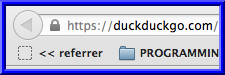
<p>To get around this issue, I use a simple bookmarklet that takes me back to the document
referrer. I place the bookmarklet underneath my back button, so I have easy access to it.</p>
<p>Here&#39;s a screenshot of a disabled back button (in a new tab):</p>
<p><img src="/images/posts/2012/12/10/without.png" alt="without referrer bookmarklet"></p>
<p>Here&#39;s a screenshot of my browser with the &quot;referrer&quot; bookmarklet:</p>
<p><img src="/images/posts/2012/12/10/with.png" alt="with referrer bookmarklet"></p>
<p>To install the bookmarklet, drag this link to your bookmark toolbar:</p>
<p><a href="javascript:(function(){document.location=document.referrer;}());">&lt;&lt; referrer</a></p>
<p>All the bookmarklet does is:</p>
<pre><code class="language-js">document.location = document.referrer;
</code></pre>
]]></content>
        <author>
            <name>skratchdot</name>
            <email>jeff@skratchdot.com</email>
            <uri>https://www.skratchdot.com/</uri>
        </author>
        <contributor>
            <name>skratchdot</name>
            <email>jeff@skratchdot.com</email>
            <uri>https://www.skratchdot.com/</uri>
        </contributor>
    </entry>
    <entry>
        <title type="html"><![CDATA[Userscript - Github: Editor Theme]]></title>
        <id>https://www.skratchdot.com/2012/12/userscript-github-editor-theme</id>
        <link href="https://www.skratchdot.com/2012/12/userscript-github-editor-theme"/>
        <updated>2012-12-08T00:00:00.000Z</updated>
        <content type="html"><![CDATA[<p>Yesterday I saw the following post on <a href="http://news.ycombinator.com/">HackerNews</a>:</p>
<p><a href="http://news.ycombinator.com/item?id=4886560">Let&#39;s make GitHub better, together</a>.</p>
<p>I saw the section on <a href="http://letsmake.github.com/bettertogether/#ace">Revamping Inline Editing</a>,
and noticed one of the comments was about the way <a href="https://github.com/">Github</a> uses the
<a href="https://github.com/ajaxorg/ace">Ace Editor</a>.</p>
<p>Since I&#39;ve been working with <a href="https://github.com/ajaxorg/ace">Ace</a> some recently, I decided
to work on a userscript that let&#39;s you switch themes on Github.</p>
<p><strong>You can check it out here:</strong></p>
<ul>
<li><p><a href="https://www.skratchdot.com/projects/github-editor-theme.user.js/">Project Page</a></p>
</li>
<li><p><a href="https://github.com/skratchdot/github-editor-theme.user.js/">Github Page</a></p>
</li>
<li><p><a href="https://github.com/skratchdot/github-editor-theme.user.js/raw/master/github-editor-theme.user.js">Install</a></p>
</li>
</ul>
<p>Here is the current description from <a href="https://raw.github.com/skratchdot/github-editor-theme.user.js/master/README.md">README.md</a>:</p>
<h3>Description</h3>
<p>Add a &quot;theme&quot; dropdown when editing files in the Github UI.</p>
<h3>Screenshots</h3>
<h4>Before installing the user script:</h4>
<p><img src="https://github.com/skratchdot/github-editor-theme.user.js/raw/master/images/before.png" alt="Before Installation"></p>
<h4>After installing the user script:</h4>
<p><img src="https://github.com/skratchdot/github-editor-theme.user.js/raw/master/images/after.png" alt="After Installation"></p>
]]></content>
        <author>
            <name>skratchdot</name>
            <email>jeff@skratchdot.com</email>
            <uri>https://www.skratchdot.com/</uri>
        </author>
        <contributor>
            <name>skratchdot</name>
            <email>jeff@skratchdot.com</email>
            <uri>https://www.skratchdot.com/</uri>
        </contributor>
    </entry>
    <entry>
        <title type="html"><![CDATA[List Tool: a simple way to compare lists]]></title>
        <id>https://www.skratchdot.com/2012/12/list-tool-a-simple-way-to-compare-lists</id>
        <link href="https://www.skratchdot.com/2012/12/list-tool-a-simple-way-to-compare-lists"/>
        <updated>2012-12-07T00:00:00.000Z</updated>
        <content type="html"><![CDATA[<p>This week at work I was comparing 2 lists from 2 different sources. I frequently
perform tasks like this, and always end up writing the same comparison code over and over.</p>
<p>One night after work, I decided to write a simple web app to do the list comparisons
for me.</p>
<p>As of now, the app has the following features:</p>
<ul>
<li><p><a href="https://en.wikipedia.org/wiki/Set_%28mathematics%29">set operations</a></p>
</li>
<li><p>other operations: sort, reverse, unique, trim</p>
</li>
<li><p>uses the <a href="https://github.com/ajaxorg/ace/">Ace Editor</a> (instead of default textarea elements)</p>
</li>
<li><p>uses <a href="http://github.com/twitter/bootstrap/">Twitter Bootstrap</a></p>
</li>
<li><p><a href="http://bradfrost.github.com/this-is-responsive/">responsive design</a>: 4 different display sizes
will change the layout</p>
</li>
<li><p>live editing: the results/counts will be updated as you add new items to lists</p>
</li>
<li><p>a logo visualization of the currently selected comparison operation</p>
</li>
<li><p>using <a href="http://www.w3.org/TR/workers/">Web Workers</a> (when available) to support larger datasets</p>
</li>
</ul>
<p>You can check out the project page here:</p>
<p><a href="https://www.skratchdot.com/projects/list-tool/">Project Page</a></p>
<p>You can bookmark, and use the application here:</p>
<p><a href="http://projects.skratchdot.com/list-tool/">List Tool</a></p>
]]></content>
        <author>
            <name>skratchdot</name>
            <email>jeff@skratchdot.com</email>
            <uri>https://www.skratchdot.com/</uri>
        </author>
        <contributor>
            <name>skratchdot</name>
            <email>jeff@skratchdot.com</email>
            <uri>https://www.skratchdot.com/</uri>
        </contributor>
    </entry>
    <entry>
        <title type="html"><![CDATA[tojs - (a shell script)]]></title>
        <id>https://www.skratchdot.com/2012/11/tojs-a-shell-script</id>
        <link href="https://www.skratchdot.com/2012/11/tojs-a-shell-script"/>
        <updated>2012-11-04T00:00:00.000Z</updated>
        <content type="html"><![CDATA[<p>Earlier today I was updating one of my
<a href="http://projects.skratchdot.com/domFormat/bookmarklet/index.html">bookmarklets</a>
when I ran into the need to convert a html string to a javascript variable.</p>
<p>I was going to create a quick webpage to do it for me, but that would have still required me
to do a lot of manual copy-n-pasting (copying the html into a form, clicking a button, and pasting the
result into a new file).</p>
<p>What I really wanted was a one liner that I could use in my terminal.</p>
<p>I ended up using a combination of <strong>cat</strong> and <strong>sed</strong> to get my desired output. The combined result
is a shell script called: <a href="https://github.com/skratchdot/tojs/">tojs</a>.</p>
<p>You can install it by running the following commands:</p>
<p><strong>NOTE:<br>THE FOLLOWING INSTALLATION INSTRUCTIONS ARE OUTDATED. SEE THE UPDATED SECTION BELOW.</strong></p>
<pre><code class="language-bash">sudo curl https://raw.github.com/skratchdot/tojs/1.1.0/tojs.sh -o /usr/local/bin/tojs
sudo chmod +x /usr/local/bin/tojs
</code></pre>
<p><strong>UPDATED (12/27/2012):</strong></p>
<p><a href="https://github.com/skratchdot/tojs/">tojs</a> was converted to a <a href="http://nodejs.org/">node.js</a> project
on December 27th, 2012. Due to this fact, the installation instructions have changed. This project
now requires <a href="https://npmjs.org/">npm</a> and can be installed by running:</p>
<pre><code class="language-bash">npm install -g tojs
</code></pre>
]]></content>
        <author>
            <name>skratchdot</name>
            <email>jeff@skratchdot.com</email>
            <uri>https://www.skratchdot.com/</uri>
        </author>
        <contributor>
            <name>skratchdot</name>
            <email>jeff@skratchdot.com</email>
            <uri>https://www.skratchdot.com/</uri>
        </contributor>
    </entry>
    <entry>
        <title type="html"><![CDATA[Userscript - Github: Get Missing Descriptions]]></title>
        <id>https://www.skratchdot.com/2012/08/userscript-github-get-missing-descriptions</id>
        <link href="https://www.skratchdot.com/2012/08/userscript-github-get-missing-descriptions"/>
        <updated>2012-08-12T00:00:00.000Z</updated>
        <content type="html"><![CDATA[<p>On <a href="https://github.com">Github</a> profiles, not all the repositories
have description info listed underneath them. Only the repositories
with recent updates contain detailed information.</p>
<p>This is necessary for users with a large number of repos so that page
load times are acceptable (also, there&#39;s no need to show all repo info
for someone with 1000+ repos).</p>
<p>To find out more about older repositories, you have to visit each repo page.</p>
<p>To help out with this manual process, I&#39;ve created:
<a href="https://github.com/skratchdot/github-get-missing-descriptions.user.js/">Github: Get Missing Descriptions</a>.</p>
<p>This script adds a button that will update &quot;simple&quot; repo listings with the
project&#39;s description, as well as the last time it was updated. Each button
click will make a max of 50 ajax requests. If there are more than 50 repos without
descriptions, you will have to click the button multiple times.</p>
<p><strong>You can check it out here:</strong></p>
<ul>
<li><p><a href="https://www.skratchdot.com/projects/github-get-missing-descriptions.user.js/">Project Page</a></p>
</li>
<li><p><a href="https://github.com/skratchdot/github-get-missing-descriptions.user.js/">Github Page</a></p>
</li>
<li><p><a href="https://github.com/skratchdot/github-get-missing-descriptions.user.js/raw/master/github-get-missing-descriptions.user.js">Install</a></p>
</li>
</ul>
<p>Here is the current description from <a href="https://raw.github.com/skratchdot/github-get-missing-descriptions.user.js/master/README.md">README.md</a>:</p>
<h3>Description</h3>
<p>If there are missing descriptions on a Github profile page,
a button will be added. When clicked, ajax requests will be made
to grab the descriptions.</p>
<h3>Screenshots</h3>
<h4>Before installing the user script:</h4>
<p><img src="https://github.com/skratchdot/github-get-missing-descriptions.user.js/raw/master/images/before.png" alt="Before Installation"></p>
<h4>After installing the user script:</h4>
<p><strong>Before clicking the button:</strong><br><img src="https://github.com/skratchdot/github-get-missing-descriptions.user.js/raw/master/images/after1.png" alt="After Installation (before clicking the button)"></p>
<p><strong>After clicking the button:</strong><br><img src="https://github.com/skratchdot/github-get-missing-descriptions.user.js/raw/master/images/after2.png" alt="After Installation (after clicking the button)"></p>
]]></content>
        <author>
            <name>skratchdot</name>
            <email>jeff@skratchdot.com</email>
            <uri>https://www.skratchdot.com/</uri>
        </author>
        <contributor>
            <name>skratchdot</name>
            <email>jeff@skratchdot.com</email>
            <uri>https://www.skratchdot.com/</uri>
        </contributor>
    </entry>
    <entry>
        <title type="html"><![CDATA[Can't Install Userscripts in Chrome 21+]]></title>
        <id>https://www.skratchdot.com/2012/08/can't-install-userscripts-in-chrome-21+</id>
        <link href="https://www.skratchdot.com/2012/08/can't-install-userscripts-in-chrome-21+"/>
        <updated>2012-08-04T00:00:00.000Z</updated>
        <content type="html"><![CDATA[<p>Today I was updating one of my <a href="https://github.com/skratchdot/github-repo-filter-info.user.js/">userscripts</a>,
but when I went to test my changes in Chrome, I saw the following warning:</p>
<p><img src="/images/posts/2012/08/04/userscripts.png" alt="Chrome Userscript / Extension Warning Message"></p>
<p>The <a href="http://www.chromium.org/administrators/policy-list-3#ExtensionInstallSources">learn more</a>
link took me to this page:</p>
<p><a href="http://www.chromium.org/administrators/policy-list-3#ExtensionInstallSources">http://www.chromium.org/administrators/policy-list-3#ExtensionInstallSources</a></p>
<p>Following the directions for OSX, I tried adding the <strong>ExtensionInstallSources</strong> preference
via the command line:</p>
<p><em>Chrome:</em></p>
<pre><code>defaults write com.google.Chrome ExtensionInstallSources -array &quot;https://github.com/skratchdot/*&quot;
</code></pre>
<p><em>Chrome Canary:</em></p>
<pre><code>defaults write com.google.Chrome.canary ExtensionInstallSources -array &quot;https://github.com/skratchdot/*&quot;
</code></pre>
<p>I restarted Chrome, and still could not install my userscript.</p>
<p>After reading through this bug:</p>
<p><a href="http://code.google.com/p/chromium/issues/detail?id=138054">http://code.google.com/p/chromium/issues/detail?id=138054</a></p>
<p>I found the <strong>--enable-easy-off-store-extension-install</strong> switch. By using that, I was able to start
Chrome from the command line to install my userscript.</p>
<p><em>Chrome:</em></p>
<pre><code>/Applications/Google\ Chrome.app/Contents/MacOS/Google\ Chrome --enable-easy-off-store-extension-install
</code></pre>
<p><em>Chrome Canary:</em></p>
<pre><code>/Applications/Google\ Chrome\ Canary.app/Contents/MacOS/Google\ Chrome\ Canary --enable-easy-off-store-extension-install
</code></pre>
<p>It would be nice if the <strong>&quot;Tools&quot;-&gt;&quot;Extensions&quot;</strong> page (aka <strong>chrome://chrome/extensions/</strong>)
had a list of whitelist/blacklist URLs that you could edit. That page allows you to enter
&quot;Developer Mode&quot;, so it makes sense to have a few more options there.</p>
<p><strong><em>EDIT:</em></strong></p>
<p>This workaround exists as well:</p>
<ol>
<li>Download the user script.</li>
<li>Open <strong>chrome://chrome/extensions/</strong>.</li>
<li>Drag and drop the user script file on the page you opened in step 2.</li>
</ol>
]]></content>
        <author>
            <name>skratchdot</name>
            <email>jeff@skratchdot.com</email>
            <uri>https://www.skratchdot.com/</uri>
        </author>
        <contributor>
            <name>skratchdot</name>
            <email>jeff@skratchdot.com</email>
            <uri>https://www.skratchdot.com/</uri>
        </contributor>
    </entry>
    <entry>
        <title type="html"><![CDATA[mesh: the MongoDB Extended Shell]]></title>
        <id>https://www.skratchdot.com/2012/07/mesh-the-mongodb-extended-shell</id>
        <link href="https://www.skratchdot.com/2012/07/mesh-the-mongodb-extended-shell"/>
        <updated>2012-07-17T00:00:00.000Z</updated>
        <content type="html"><![CDATA[<p>I saw a blog post today called:
<a href="http://blog.mongodb.org/post/27406586932/mongo-the-mongodb-shell">mongo, the MongoDB Shell</a>.</p>
<p>Since I work in the shell some, and have written a few shell extensions, I decided to create
<a href="/projects/mesh/">mesh: MongoDB Extended Shell</a>.</p>
<p>The hope is that it will grow into a collection of community created scripts that add functionality
to the default mongo shell (while not interfering with it).</p>
<p>So far, I&#39;ve included a few utility libraries: <a href="http://underscorejs.org">underscore.js</a>,
<a href="http://epeli.github.com/underscore.string/">underscore.string.js</a>, and
<a href="http://momentjs.com/">moment.js</a>.</p>
<p>I&#39;ve also included some of the extensions that I&#39;ve created in the past. Additionally, there&#39;s
some code so that <strong>&quot;console&quot;</strong> calls end up wrapping the built in <strong>print()</strong> function. The idea
is that eventually I&#39;ll add some logic to the console calls so they behave in a more &quot;standard&quot; way.</p>
<p>Another feature is the <strong>mesh.setPrompt()</strong> function. You can pass in a function, or a number 0-4. There
are a few different types of prompts you can use:</p>
<ul>
<li>0: &#39;&gt;&#39; reset to default prompt</li>
<li>1: &#39;dbname&gt;&#39;</li>
<li>2: &#39;dbname&gt;&#39; for PRIMARY, &#39;(dbname)&gt;&#39; for SECONDARY</li>
<li>3: &#39;host:dbname&gt;&#39;</li>
<li>4: &#39;[YYYY-MM-DD hh:mm:ss] host:dbname&gt;&#39;</li>
<li>passing in a function() is the same thing as setting: prompt = myFunction()</li>
</ul>
<p><strong>mesh.setPrompt()</strong> was inspired by the blog post:
<a href="http://www.kchodorow.com/blog/2011/06/27/ps1/">http://www.kchodorow.com/blog/2011/06/27/ps1/</a></p>
<p>Check it out here (and download) here: <a href="https://github.com/skratchdot/mesh/">https://github.com/skratchdot/mesh/</a></p>
]]></content>
        <author>
            <name>skratchdot</name>
            <email>jeff@skratchdot.com</email>
            <uri>https://www.skratchdot.com/</uri>
        </author>
        <contributor>
            <name>skratchdot</name>
            <email>jeff@skratchdot.com</email>
            <uri>https://www.skratchdot.com/</uri>
        </contributor>
    </entry>
    <entry>
        <title type="html"><![CDATA[Coldfusion: Convert String To Struct]]></title>
        <id>https://www.skratchdot.com/2012/07/coldfusion-convert-string-to-struct</id>
        <link href="https://www.skratchdot.com/2012/07/coldfusion-convert-string-to-struct"/>
        <updated>2012-07-15T00:00:00.000Z</updated>
        <content type="html"><![CDATA[<p>The other day I had the need to create a nested structure
based off of a key using dot notation.</p>
<p>Below is the function I came up with:</p>
<pre><code class="language-cfm">&lt;cfscript&gt;

private struct function convertStringToStruct(required string key, required any value, string delimiter = &quot;.&quot;) {
    var obj = StructNew();
    var first = ListFirst(arguments.key, arguments.delimiter);
    var rest = ListRest(arguments.key, arguments.delimiter);

    if (Len(rest)) {
        obj[first] = convertStringToStruct(rest, arguments.value, arguments.delimiter);
    } else {
        obj[first] = arguments.value;
    }

    return obj;
}

&lt;/cfscript&gt;
</code></pre>
<p>Here&#39;s a quick example usage:</p>
<pre><code class="language-cfm">&lt;cfscript&gt;

	// Declare a struct. We will later append to this
	obj = StructNew();

	// Create a few top level keys
	obj[&quot;ab&quot;] = &quot;foo&quot;;
	obj[&quot;b&quot;] = &quot;bar&quot;;

	// Append a dynamically created structure
	StructAppend(obj, convertStringToStruct(&quot;a.b.c&quot;, &quot;baz&quot;), false);

	// Show our output
	WriteDump(obj);

&lt;/cfscript&gt;
</code></pre>
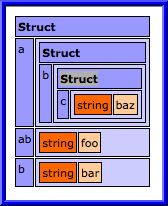
<p>The output from the above example:</p>
<p><img src="/images/posts/2012/07/15/cfdump.png" alt="cfdump output of convertStringToStruct() example"></p>
<p>Here is a gist containing the code:</p>
<p><a href="https://gist.github.com/3118727">https://gist.github.com/3118727</a></p>
]]></content>
        <author>
            <name>skratchdot</name>
            <email>jeff@skratchdot.com</email>
            <uri>https://www.skratchdot.com/</uri>
        </author>
        <contributor>
            <name>skratchdot</name>
            <email>jeff@skratchdot.com</email>
            <uri>https://www.skratchdot.com/</uri>
        </contributor>
    </entry>
    <entry>
        <title type="html"><![CDATA[OSX Screenshot With Border From Command Line]]></title>
        <id>https://www.skratchdot.com/2012/07/osx-screenshot-with-border-from-command-line</id>
        <link href="https://www.skratchdot.com/2012/07/osx-screenshot-with-border-from-command-line"/>
        <updated>2012-07-14T00:00:00.000Z</updated>
        <content type="html"><![CDATA[<p>There are a few ways you can take <a href="http://guides.macrumors.com/Taking_Screenshots_in_Mac_OS_X">screenshots in OSX</a>,
and a few ways you can add borders to images.</p>
<p>Recently I&#39;ve found the need to take screenshots of portions of my screen, and add
a border to the resultant images. Most of the methods I was using were very time consuming.</p>
<p>I decided to script something out so I could easily use the commandline to accomplish this task.</p>
<p>After some evaluation, I decided to use <a href="http://guides.macrumors.com/screencapture">screencapture</a>
and <a href="http://www.imagemagick.org/">ImageMagick</a>.</p>
<p><a href="http://www.imagemagick.org/">ImageMagick</a> comes with of few utilities, one of which is
<a href="http://www.imagemagick.org/script/import.php">import</a>.</p>
<p>I could have used that tool exclusively (and not used screencapture) if it weren&#39;t for the fact
that import relies on the <a href="http://en.wikipedia.org/wiki/X_Window_System">X Window System</a> (in
OSX it&#39;s called X11). I wanted something that could take a screenshot without being in an X11
window.</p>
<p>In the end, I created a shell script called <a href="/projects/framecapture/">framecapture</a>.</p>
<p>It&#39;s a very basic script:</p>
<pre><code class="language-bash">#!/bin/bash

screencapture -is &quot;$1&quot;
convert &quot;$1&quot; -mattecolor blue -frame 6x6+2+2 &quot;$1&quot;
</code></pre>
<p>But I decided to add some error handling, and optional parameters to it.</p>
<p>You can view it on <a href="https://github.com/skratchdot/framecapture/">Github</a>, or install it by running:</p>
<pre><code class="language-bash">sudo curl https://raw.github.com/skratchdot/framecapture/master/framecapture.sh -o /usr/local/bin/framecapture
sudo chmod +x /usr/local/bin/framecapture
</code></pre>
]]></content>
        <author>
            <name>skratchdot</name>
            <email>jeff@skratchdot.com</email>
            <uri>https://www.skratchdot.com/</uri>
        </author>
        <contributor>
            <name>skratchdot</name>
            <email>jeff@skratchdot.com</email>
            <uri>https://www.skratchdot.com/</uri>
        </contributor>
    </entry>
    <entry>
        <title type="html"><![CDATA[Userscript - Github: Twitter Link]]></title>
        <id>https://www.skratchdot.com/2012/07/userscript-github-twitter-link</id>
        <link href="https://www.skratchdot.com/2012/07/userscript-github-twitter-link"/>
        <updated>2012-07-05T00:00:00.000Z</updated>
        <content type="html"><![CDATA[<p>While browsing <a href="https://github.com">Github</a> profiles, I notice I&#39;ll frequently
change the url from <a href="https://github.com">github.com</a> to <a href="https://twitter.com">twitter.com</a>
to see if that particular user has a <a href="https://twitter.com">Twitter</a> account.</p>
<p>To save on some of that manual activity, I created a new userscript today:
<a href="https://github.com/skratchdot/github-twitter-link.user.js/">Github: Twitter Link</a>.</p>
<p><strong>You can check it out here:</strong></p>
<ul>
<li><p><a href="https://www.skratchdot.com/projects/github-twitter-link.user.js/">Project Page</a></p>
</li>
<li><p><a href="https://github.com/skratchdot/github-twitter-link.user.js/">Github Page</a></p>
</li>
<li><p><a href="https://github.com/skratchdot/github-twitter-link.user.js/raw/master/github-twitter-link.user.js">Install</a></p>
</li>
</ul>
<p>Here is the current description from <a href="https://raw.github.com/skratchdot/github-twitter-link.user.js/master/README.md">README.md</a>:</p>
<h3>Description</h3>
<p>This is a user script that adds a twitter link on Github profile
pages if a corresponding user name exists at Twitter. It utilizes
local storage to minimize multiple Twitter API requests. If a corresponding
user name is not found, then we will not check for it again. At some point I
may add a &quot;time limit&quot; on when to check again.</p>
<h3>Screenshots</h3>
<h4>Before installing the user script:</h4>
<p><img src="https://github.com/skratchdot/github-twitter-link.user.js/raw/master/images/before.png" alt="Before Installation"></p>
<h4>After installing the user script:</h4>
<p><strong>Twitter account exists:</strong><br><img src="https://github.com/skratchdot/github-twitter-link.user.js/raw/master/images/after1.png" alt="After Installation - Account exists"></p>
<p><strong>Twitter account doesn&#39;t exist:</strong><br><img src="https://github.com/skratchdot/github-twitter-link.user.js/raw/master/images/after2.png" alt="After Installation - Account doesn&#39;t exist"></p>
]]></content>
        <author>
            <name>skratchdot</name>
            <email>jeff@skratchdot.com</email>
            <uri>https://www.skratchdot.com/</uri>
        </author>
        <contributor>
            <name>skratchdot</name>
            <email>jeff@skratchdot.com</email>
            <uri>https://www.skratchdot.com/</uri>
        </contributor>
    </entry>
    <entry>
        <title type="html"><![CDATA[Open Electribe Editor - v1.0.4 Released]]></title>
        <id>https://www.skratchdot.com/2012/06/open-electribe-editor-v1-0-4-released</id>
        <link href="https://www.skratchdot.com/2012/06/open-electribe-editor-v1-0-4-released"/>
        <updated>2012-06-03T00:00:00.000Z</updated>
        <content type="html"><![CDATA[<h3>v1.0.4 - Released June 03, 2012</h3>
<ul>
<li>[<a href="https://github.com/skratchdot/open-electribe-editor/issues/15">BUG: #15</a>] Fixed a bug that prevented valid 16-bit PCM wave files from loading</li>
</ul>
<p>Download here: <a href="http://code.google.com/p/open-electribe-editor/downloads/list">http://code.google.com/p/open-electribe-editor/downloads/list</a></p>
]]></content>
        <author>
            <name>skratchdot</name>
            <email>jeff@skratchdot.com</email>
            <uri>https://www.skratchdot.com/</uri>
        </author>
        <contributor>
            <name>skratchdot</name>
            <email>jeff@skratchdot.com</email>
            <uri>https://www.skratchdot.com/</uri>
        </contributor>
    </entry>
    <entry>
        <title type="html"><![CDATA[Prevent console calls from throwing errors]]></title>
        <id>https://www.skratchdot.com/2012/05/prevent-console-calls-from-throwing-errors</id>
        <link href="https://www.skratchdot.com/2012/05/prevent-console-calls-from-throwing-errors"/>
        <updated>2012-05-30T00:00:00.000Z</updated>
        <content type="html"><![CDATA[<p>If you try to use <strong>window.console</strong> calls in older browsers, an error will be thrown.</p>
<p>There are a few ways to get around this. One way is to use a
<a href="http://www.calormen.com/polyfill/#console">console polyfill</a>. Another way is to
use a <a href="http://benalman.com/projects/javascript-debug-console-log/">console wrapper</a>.
Yet one additional way is by creating empty functions for all the available
<strong>window.console</strong> calls.</p>
<p>This blog post provides some code to achieve the third method listed above. The code
first ensures that <strong>window.console</strong> exists. It then ensures that all functions in
the <a href="http://getfirebug.com/wiki/index.php/Console_API">Firebug Console API</a>
exist in the <strong>window.console</strong> object. We default to an empty function so older browsers
don&#39;t throw errors. If a given <strong>window.console</strong> function already exists, we will use the
default browser behavior.</p>
<h3>Un-Minified Version:</h3>
<!-- prettier-ignore-start -->
<pre><code class="language-js">/*jslint browser: true, plusplus: true */
(function (window) {
	&#39;use strict&#39;;

	var i = 0,
		emptyFunction = function () {},
		functionNames = [
			&#39;assert&#39;, &#39;clear&#39;, &#39;count&#39;, &#39;debug&#39;, &#39;dir&#39;,
			&#39;dirxml&#39;, &#39;error&#39;, &#39;exception&#39;, &#39;group&#39;, &#39;groupCollapsed&#39;,
			&#39;groupEnd&#39;, &#39;info&#39;, &#39;log&#39;, &#39;profile&#39;, &#39;profileEnd&#39;, &#39;table&#39;,
			&#39;time&#39;, &#39;timeEnd&#39;, &#39;timeStamp&#39;, &#39;trace&#39;, &#39;warn&#39;
		];

	// Make sure window.console exists
	window.console = window.console || {};

	// Make sure all functions exist
	for (i = 0; i &lt; functionNames.length; i++) {
		window.console[functionNames[i]] = window.console[functionNames[i]] || emptyFunction;
	}

}(window));
</code></pre>
<!-- prettier-ignore-end --><h3>Minified Version:</h3>
<!-- prettier-ignore-start -->
<pre><code class="language-js">/* https://www.skratchdot.com/2012/05/prevent-console-calls-from-throwing-errors/ */
(function(b){var a=0,c=function(){},d=[&quot;assert&quot;,&quot;clear&quot;,&quot;count&quot;,&quot;debug&quot;,&quot;dir&quot;,&quot;dirxml&quot;,&quot;error&quot;,&quot;exception&quot;,&quot;group&quot;,&quot;groupCollapsed&quot;,&quot;groupEnd&quot;,&quot;info&quot;,&quot;log&quot;,&quot;profile&quot;,&quot;profileEnd&quot;,&quot;table&quot;,&quot;time&quot;,&quot;timeEnd&quot;,&quot;timeStamp&quot;,&quot;trace&quot;,&quot;warn&quot;];b.console=b.console||{};for(a=0;a&lt;d.length;a++){b.console[d[a]]=b.console[d[a]]||c}}(window));
</code></pre>
<!-- prettier-ignore-end -->
]]></content>
        <author>
            <name>skratchdot</name>
            <email>jeff@skratchdot.com</email>
            <uri>https://www.skratchdot.com/</uri>
        </author>
        <contributor>
            <name>skratchdot</name>
            <email>jeff@skratchdot.com</email>
            <uri>https://www.skratchdot.com/</uri>
        </contributor>
    </entry>
    <entry>
        <title type="html"><![CDATA[Ubuntu Dual Boot - Change Default OS]]></title>
        <id>https://www.skratchdot.com/2012/05/ubuntu-dual-boot-change-default-os</id>
        <link href="https://www.skratchdot.com/2012/05/ubuntu-dual-boot-change-default-os"/>
        <updated>2012-05-29T00:00:00.000Z</updated>
        <content type="html"><![CDATA[<p>On one of my laptops, I&#39;m dual booting Windows 7 and Ubuntu 12.04 with Grub2 as the bootloader.</p>
<p>I always forget what steps to take to &quot;remember my last OS&quot; when booting.</p>
<p>First, you need to modify <strong>/etc/default/grub</strong>:</p>
<pre><code class="language-bash">sudo vi /etc/default/grub
</code></pre>
<p>By adding the following 2 lines:</p>
<pre><code class="language-text">  GRUB_DEFAULT=saved
  GRUB_SAVEDEFAULT=true
</code></pre>
<p>After modifying this file, you need to update GRUB&#39;s configuration by executing the following 2 commands:</p>
<pre><code class="language-bash">sudo grub-mkconfig
sudo update-grub
</code></pre>
<h3>Links</h3>
<p>See the <a href="https://help.ubuntu.com/community/Grub2#Saved">Ubuntu Grub2 Help Page</a>
or this <a href="http://superuser.com/questions/95828/making-default-saved-work-with-grub2/205360#205360">Stack Overflow Answer</a></p>
]]></content>
        <author>
            <name>skratchdot</name>
            <email>jeff@skratchdot.com</email>
            <uri>https://www.skratchdot.com/</uri>
        </author>
        <contributor>
            <name>skratchdot</name>
            <email>jeff@skratchdot.com</email>
            <uri>https://www.skratchdot.com/</uri>
        </contributor>
    </entry>
    <entry>
        <title type="html"><![CDATA[CSS3 Zoopraxiscope]]></title>
        <id>https://www.skratchdot.com/2012/05/css3-zoopraxiscope</id>
        <link href="https://www.skratchdot.com/2012/05/css3-zoopraxiscope"/>
        <updated>2012-05-28T00:00:00.000Z</updated>
        <content type="html"><![CDATA[<p>I was going through some old files on my laptop, and found this snippet of code I created back in
April. On April 9th, there was a google doodle for
<a href="http://www.google.com/doodles/eadweard-j-muybridges-182nd-birthday">Eadweard J. Muybridge&#39;s 182nd Birthday</a>.</p>
<p>I saw a post on <a href="http://news.ycombinator.com/item?id=3816692">HackerNews</a>
in which someone created a pure CSS version of the google doodle.</p>
<p>I created a <a href="http://jsfiddle.net/F5Uf5/">JSFiddle</a> snippet that day, but never posted it anywhere.</p>
<p>Anyways, I&#39;ve cleaned the example up a bit, and posted it below. It now contains pure CSS3 controls
to turn the demo on/off or change the speed of the animation.</p>
<h2>Demo</h2>
<style type="text/css">
	img#zoopraxiscope {
		width:230px;
		height:230px;		
	}
	@-webkit-keyframes spin {
		from { -webkit-transform: rotate(0deg); }
		to { -webkit-transform: rotate(-360deg); }
	}
	@-moz-keyframes spin {
		from { -moz-transform: rotate(0deg); }
		to { -moz-transform: rotate(-360deg); }
	}
	@-ms-keyframes spin {
		from { -ms-transform: rotate(0deg); }
		to { -ms-transform: rotate(-360deg); }
	}
	a#animation-on:target~input[value=fast]:checked~img#zoopraxiscope {
		-webkit-animation: spin 230ms infinite linear; 
		-moz-animation: spin 230ms infinite linear; 
		-ms-animation: spin 230ms infinite linear; 
	}
	a#animation-on:target~input[value=medium]:checked~img#zoopraxiscope {
		-webkit-animation: spin 920ms infinite linear; 
		-moz-animation: spin 920ms infinite linear; 
		-ms-animation: spin 920ms infinite linear; 
	}
	a#animation-on:target~input[value=slow]:checked~img#zoopraxiscope {
		-webkit-animation: spin 2000ms infinite linear; 
		-moz-animation: spin 2000ms infinite linear; 
		-ms-animation: spin 2000ms infinite linear; 
	}
</style><form style="text-align:center">
	<h3>Turn Animation</h3>
	<a id="animation-off" href="#animation-off">Off</a>
	<a id="animation-on" href="#animation-on">On</a>
	<br />
	<h3>Speed:</h3>
	<label for="fast">Fast:</label>
	<input type="radio" name="speed" id="fast" value="fast" checked="checked" />
	<br />
	<label for="medium">Medium:</label>
	<input type="radio" name="speed" id="medium" value="medium" />
	<br />
	<label for="slow">Slow:</label>
	<input type="radio" name="speed" id="slow" value="slow" />
	<div style="height:50px">&nbsp;</div>
	<img id="zoopraxiscope" src="/images/posts/2012/05/28/zoopraxiscope.jpg" />
</form><h2>CSS:</h2>
<pre><code class="language-css">&lt;style type=&quot;text/css&quot;&gt;
	img#zoopraxiscope {
		width:230px;
		height:230px;
	}
	@-webkit-keyframes spin {
		from { -webkit-transform: rotate(0deg); }
		to { -webkit-transform: rotate(-360deg); }
	}
	@-moz-keyframes spin {
		from { -moz-transform: rotate(0deg); }
		to { -moz-transform: rotate(-360deg); }
	}
	@-ms-keyframes spin {
		from { -ms-transform: rotate(0deg); }
		to { -ms-transform: rotate(-360deg); }
	}
	a#animation-on:target~input[value=fast]:checked~img#zoopraxiscope {
		-webkit-animation: spin 230ms infinite linear;
		-moz-animation: spin 230ms infinite linear;
		-ms-animation: spin 230ms infinite linear;
	}
	a#animation-on:target~input[value=medium]:checked~img#zoopraxiscope {
		-webkit-animation: spin 920ms infinite linear;
		-moz-animation: spin 920ms infinite linear;
		-ms-animation: spin 920ms infinite linear;
	}
	a#animation-on:target~input[value=slow]:checked~img#zoopraxiscope {
		-webkit-animation: spin 2000ms infinite linear;
		-moz-animation: spin 2000ms infinite linear;
		-ms-animation: spin 2000ms infinite linear;
	}
&lt;/style&gt;
</code></pre>
<h2>HTML:</h2>
<pre><code class="language-html">&lt;form style=&quot;text-align:center&quot;&gt;
  &lt;h3&gt;Turn Animation&lt;/h3&gt;
  &lt;a id=&quot;animation-off&quot; href=&quot;#animation-off&quot;&gt;Off&lt;/a&gt;
  &lt;a id=&quot;animation-on&quot; href=&quot;#animation-on&quot;&gt;On&lt;/a&gt;
  &lt;br /&gt;
  &lt;h3&gt;Speed:&lt;/h3&gt;
  &lt;label for=&quot;fast&quot;&gt;Fast:&lt;/label&gt;
  &lt;input type=&quot;radio&quot; name=&quot;speed&quot; id=&quot;fast&quot; value=&quot;fast&quot; checked=&quot;checked&quot; /&gt;
  &lt;br /&gt;
  &lt;label for=&quot;medium&quot;&gt;Medium:&lt;/label&gt;
  &lt;input type=&quot;radio&quot; name=&quot;speed&quot; id=&quot;medium&quot; value=&quot;medium&quot; /&gt;
  &lt;br /&gt;
  &lt;label for=&quot;slow&quot;&gt;Slow:&lt;/label&gt;
  &lt;input type=&quot;radio&quot; name=&quot;speed&quot; id=&quot;slow&quot; value=&quot;slow&quot; /&gt;
  &lt;div style=&quot;height:50px&quot;&gt;&amp;nbsp;&lt;/div&gt;
  &lt;img id=&quot;zoopraxiscope&quot; src=&quot;/images/posts/2012/05/28/zoopraxiscope.jpg&quot; /&gt;
&lt;/form&gt;
</code></pre>
<h2>Links</h2>
<p>Inspired by the <a href="http://www.google.com/doodles/eadweard-j-muybridges-182nd-birthday">Google Doodle</a>
on April 9th, 2012 celebrating Eadweard J. Muybridge</p>
<p><em>See:</em></p>
<ul>
<li><p><a href="http://news.ycombinator.com/item?id=3816692">http://news.ycombinator.com/item?id=3816692</a></p>
</li>
<li><p><a href="http://en.wikipedia.org/wiki/Zoopraxiscope">http://en.wikipedia.org/wiki/Zoopraxiscope</a></p>
</li>
<li><p><a href="http://davidwalsh.name/css-spin-revisited">http://davidwalsh.name/css-spin-revisited</a></p>
</li>
<li><p><a href="http://www.tangledindesign.com/blog/how-to-trigger-css3-transitions-on-click-using-target/">http://www.tangledindesign.com/blog/how-to-trigger-css3-transitions-on-click-using-target/</a></p>
</li>
</ul>
<p><em>See also:</em></p>
<ul>
<li><a href="http://jsfiddle.net/F5Uf5/">http://jsfiddle.net/F5Uf5/</a></li>
</ul>
]]></content>
        <author>
            <name>skratchdot</name>
            <email>jeff@skratchdot.com</email>
            <uri>https://www.skratchdot.com/</uri>
        </author>
        <contributor>
            <name>skratchdot</name>
            <email>jeff@skratchdot.com</email>
            <uri>https://www.skratchdot.com/</uri>
        </contributor>
    </entry>
    <entry>
        <title type="html"><![CDATA[Windows is slow after adding more memory]]></title>
        <id>https://www.skratchdot.com/2012/05/windows-is-slow-after-adding-more-memory</id>
        <link href="https://www.skratchdot.com/2012/05/windows-is-slow-after-adding-more-memory"/>
        <updated>2012-05-15T00:00:00.000Z</updated>
        <content type="html"><![CDATA[<p>I dual boot my <a href="http://www.dell.com/us/business/p/precision-m6500/pd">Dell Precision m6500</a> with
Windows 7 and Ubuntu 12.04. I recently upgraded the memory from 8gb (4x2gb) to 32gb (4x8gb). Ridiculous
I know. This is my work laptop and the extra RAM is useful.</p>
<p>Anyways, after replacing the RAM, Windows slowed down dramatically. The startup screen was
taking over 10 minutes to load. I tried disabling the
<a href="http://windows.microsoft.com/en-us/windows7/Change-the-size-of-virtual-memory">page file (and virtual memory)</a>,
then rebooted. Windows was still taking forever to start.</p>
<p>Once it finally loaded, everything was super slow. The CPU wasn&#39;t really spiking, and the disk
usage didn&#39;t look crazy, but any action took forever. Even the mouse cursor was slow and jumpy.</p>
<p>When I would boot into Ubuntu, things were fine. I couldn&#39;t figure out what was wrong with Windows.</p>
<p>I tried running <a href="http://www.memtest.org/">Memtest</a>, and the tests were passing.</p>
<p>Finally, someone suggested trying to update the BIOS. That turned out to be the smoking gun. I upgraded
the BIOS from A04 to A08, and rebooted Windows. Everything started working at full speed again. I&#39;m
not sure if it was the upgrade, or the simply resetting/flashing the BIOS, but things started working.</p>
]]></content>
        <author>
            <name>skratchdot</name>
            <email>jeff@skratchdot.com</email>
            <uri>https://www.skratchdot.com/</uri>
        </author>
        <contributor>
            <name>skratchdot</name>
            <email>jeff@skratchdot.com</email>
            <uri>https://www.skratchdot.com/</uri>
        </contributor>
    </entry>
    <entry>
        <title type="html"><![CDATA[Markdown not working in Jekyll]]></title>
        <id>https://www.skratchdot.com/2012/05/markdown-not-working-in-jekyll</id>
        <link href="https://www.skratchdot.com/2012/05/markdown-not-working-in-jekyll"/>
        <updated>2012-05-12T00:00:00.000Z</updated>
        <content type="html"><![CDATA[<p>I just converted my blog from <a href="http://wordpress.org/">Wordpress</a> to <a href="https://github.com/mojombo/jekyll/">Jekyll</a>.
The process was fairly straightforward, although it took a lot of reading, and viewing other people&#39;s
example <a href="https://github.com/mojombo/jekyll/wiki/sites">sites</a>.</p>
<p>One issue that took a while for me to figure out, was a small typo.</p>
<p>In <strong>_layouts/post.html</strong>, I was using the following syntax to include my post content:</p>
<pre><code class="language-plaintext">{% raw %}{{ page.content }}{% endraw %}
</code></pre>
<p>As I was converting my posts to use markdown syntax, the posts weren&#39;t &quot;markifying&quot;. It turns out, all I needed to do was use this syntax:</p>
<pre><code class="language-plaintext">{% raw %}{{ content }}{% endraw %}
</code></pre>
]]></content>
        <author>
            <name>skratchdot</name>
            <email>jeff@skratchdot.com</email>
            <uri>https://www.skratchdot.com/</uri>
        </author>
        <contributor>
            <name>skratchdot</name>
            <email>jeff@skratchdot.com</email>
            <uri>https://www.skratchdot.com/</uri>
        </contributor>
    </entry>
    <entry>
        <title type="html"><![CDATA[MongoDB - Shell Extensions]]></title>
        <id>https://www.skratchdot.com/2012/04/mongodb-shell-extensions</id>
        <link href="https://www.skratchdot.com/2012/04/mongodb-shell-extensions"/>
        <updated>2012-04-30T00:00:00.000Z</updated>
        <content type="html"><![CDATA[<p>Last Friday I read the blog post <a href="http://blog.mongodb.org/post/21923016898/meet-variety-a-schema-analyzer-for-mongodb">Meet Variety, a Schema Analyzer for MongoDB</a>.</p>
<p>I tried <a href="https://github.com/JamesCropcho/variety/">Variety</a> out, but it didn&#39;t quite do what I wanted, and it also created a few DBs/Collections on my server that I didn&#39;t expect.</p>
<p>Over the weekend, I decided to write my own implementation called: <a href="/projects/mongodb-schema">mongodb-schema</a>. After finishing that script, I created a few more shell extensions.</p>
<p>Please note, these are just quick examples I whipped up, and are not really meant to be run on large collections (unless you use &quot;limit&quot;, or are willing to wait a really long time). They are definitely not &quot;production ready&quot;.</p>
<p>Here are the scripts:</p>
<ul>
<li><p><a href="/projects/mongodb-distinct-types">mongodb-distinct-types</a> - Similar to the db.myCollection.distinct() function, distinctTypes() will return &quot;types&quot; rather than &quot;values&quot;.</p>
</li>
<li><p><a href="/projects/mongodb-flatten">mongodb-flatten</a> - The flatten() function is a mapReduce that flattens documents into key/value pairs.</p>
</li>
<li><p><a href="/projects/mongodb-schema">mongodb-schema</a> - A schema analysis tool for MongoDB.</p>
</li>
<li><p><a href="/projects/mongodb-wild">mongodb-wild</a> - Adds a wildcard search to the mongodb shell.</p>
</li>
</ul>
]]></content>
        <author>
            <name>skratchdot</name>
            <email>jeff@skratchdot.com</email>
            <uri>https://www.skratchdot.com/</uri>
        </author>
        <contributor>
            <name>skratchdot</name>
            <email>jeff@skratchdot.com</email>
            <uri>https://www.skratchdot.com/</uri>
        </contributor>
    </entry>
    <entry>
        <title type="html"><![CDATA[Open Electribe Editor - v1.0.3 Released]]></title>
        <id>https://www.skratchdot.com/2011/09/open-electribe-editor-v1-0-3-released</id>
        <link href="https://www.skratchdot.com/2011/09/open-electribe-editor-v1-0-3-released"/>
        <updated>2011-09-10T00:00:00.000Z</updated>
        <content type="html"><![CDATA[<h3>v1.0.3 - Released September 10, 2011</h3>
<ul>
<li><p>[<a href="https://github.com/skratchdot/open-electribe-editor/issues/3">FEATURE REQUEST: #3</a>] Added the ability to import patterns from other .esx files</p>
</li>
<li><p>[<a href="https://github.com/skratchdot/open-electribe-editor/issues/13">TODO: #13</a>] Added &quot;reset perspective&quot; functionality</p>
</li>
<li><p>[<a href="https://github.com/skratchdot/open-electribe-editor/issues/14">TODO: #14</a>] Fixed unclear message when dragging audio files</p>
</li>
<li><p>[<a href="https://github.com/skratchdot/open-electribe-editor/issues/10">BUG: #10</a>] Fixed rounding issue when setting SampleTune</p>
</li>
</ul>
<p>Download here: <a href="http://code.google.com/p/open-electribe-editor/downloads/list">http://code.google.com/p/open-electribe-editor/downloads/list</a></p>
]]></content>
        <author>
            <name>skratchdot</name>
            <email>jeff@skratchdot.com</email>
            <uri>https://www.skratchdot.com/</uri>
        </author>
        <contributor>
            <name>skratchdot</name>
            <email>jeff@skratchdot.com</email>
            <uri>https://www.skratchdot.com/</uri>
        </contributor>
    </entry>
    <entry>
        <title type="html"><![CDATA[domFormat - v1.0 (Released July 25, 2011)]]></title>
        <id>https://www.skratchdot.com/2011/07/domformat-v1-0-released-july-25-2011</id>
        <link href="https://www.skratchdot.com/2011/07/domformat-v1-0-released-july-25-2011"/>
        <updated>2011-07-25T00:00:00.000Z</updated>
        <content type="html"><![CDATA[<p>domFormat is a simple javascript library to get DOM nodes as formatted/pretty strings.</p>
<p>You can find the source code here:</p>
<p><a href="https://github.com/skratchdot/domFormat">https://github.com/skratchdot/domFormat</a></p>
<p>And some examples here:</p>
<p><a href="http://projects.skratchdot.com/domFormat/examples/index-html5.html">http://projects.skratchdot.com/domFormat/examples/index-html5.html</a></p>
<p>Here are 2 bookmarklets:</p>
<ul>
<li><p><a href="javascript:%28function%28%29%7Bvar%20doc%3Ddocument.cloneNode%28true%29%7C%7Cdocument%3Bvar%20script%3Ddocument.createElement%28'script'%29%3Bscript.setAttribute%28'src'%2C'http%3A%2F%2Fprojects.skratchdot.com%2FdomFormat%2FdomFormat.min.js'%29%3Bscript.addEventListener%28'load'%2Cfunction%28%29%7Bvar%20domString%3DdomFormat.getString%28doc%29%3Bdocument.write%28'%3Ctextarea%20wrap%3D%22off%22%20id%3D%22showSource%22%20style%3D%22width%3A100%25%3Bheight%3A100%25%3Bborder%3A0%3Bmargin%3A0%3Bpadding%3A0%3Bwhitespace%3Anowrap%3B%22%3E%3C%2Ftextarea%3E'%29%3Bdocument.getElementById%28'showSource'%29.value%3DdomString%3Bdocument.close%28%29%3B%7D%2Cfalse%29%3Bdocument.body.appendChild%28script%29%3B%7D%28%29%29;">-- Show Source --</a></p>
</li>
<li><p><a href="javascript:%28function%28%29%7Bvar%20doc%3Ddocument.cloneNode%28true%29%7C%7Cdocument%3Bvar%20script%3Ddocument.createElement%28'script'%29%3Bscript.setAttribute%28'src'%2C'http%3A%2F%2Fprojects.skratchdot.com%2FdomFormat%2FdomFormat.min.js'%29%3Bscript.addEventListener%28'load'%2Cfunction%28%29%7Bvar%20domString%3DdomFormat.getString%28doc%29%3Bdocument.write%28domString%29%3Bdocument.close%28%29%3B%7D%2Cfalse%29%3Bdocument.body.appendChild%28script%29%3B%7D%28%29%29;">-- Reload Page With Formatted Source --</a></p>
</li>
</ul>
]]></content>
        <author>
            <name>skratchdot</name>
            <email>jeff@skratchdot.com</email>
            <uri>https://www.skratchdot.com/</uri>
        </author>
        <contributor>
            <name>skratchdot</name>
            <email>jeff@skratchdot.com</email>
            <uri>https://www.skratchdot.com/</uri>
        </contributor>
    </entry>
    <entry>
        <title type="html"><![CDATA[Git Diff Build Script (AKA read your Git docs)]]></title>
        <id>https://www.skratchdot.com/2011/06/git-diff-build-script-aka-read-your-git-docs</id>
        <link href="https://www.skratchdot.com/2011/06/git-diff-build-script-aka-read-your-git-docs"/>
        <updated>2011-06-05T00:00:00.000Z</updated>
        <content type="html"><![CDATA[<p>When working in SVN, I have a batch script I&#39;ve used in the past to create &quot;DEPLOY&quot; and &quot;RESTORE&quot; folders off of diffs between branches. The script will create a &quot;DEPLOY&quot; folder containing all <b>added</b> and <b>modified</b> files, and a &quot;RESTORE&quot; folder containing all <b>modified</b> files.</p>
<p>The purpose of this, is to deploy a set of files to a different environment. I can just copy the &quot;DEPLOY&quot; folder to any number of servers. If there is a bug that made it through QA, and we need to immediately rollback changes, we can just copy the &quot;RESTORE&quot; folder to all the same servers.</p>
<p>I just wrote a similar script for Git: <a href="https://github.com/skratchdot/Git-Diff-Build-Script">Git-Diff-Build-Script</a></p>
<p>While writing that script, I didn&#39;t read the Git docs closely enough, and missed the &quot;git diff&quot; <b>--diff-filter</b> parameter. Because of this, I thought I would have to use AWK to sanitize my list of files, but then I read about the <b>--diff-filter</b> parameter, and changed 2 lines of code to 1:</p>
<p><u>USING AWK:</u></p>
<pre><code class="language-bash">info=&quot;$(git diff origin/prod origin/dev --name-status)&quot;
files=&quot;$(echo &quot;$info&quot; | awk &#39;$1 ~/M|A/ {print $2}&#39;)&quot;
</code></pre>
<p><u>USING diff-filter:</u></p>
<pre><code class="language-bash">files=&quot;$(git diff origin/prod origin/dev --name-only --diff-filter=MA)&quot;
</code></pre>
]]></content>
        <author>
            <name>skratchdot</name>
            <email>jeff@skratchdot.com</email>
            <uri>https://www.skratchdot.com/</uri>
        </author>
        <contributor>
            <name>skratchdot</name>
            <email>jeff@skratchdot.com</email>
            <uri>https://www.skratchdot.com/</uri>
        </contributor>
    </entry>
    <entry>
        <title type="html"><![CDATA[SerializeJSON() in ColdFusion with Unicode Characters]]></title>
        <id>https://www.skratchdot.com/2011/05/serializejson-in-coldfusion-with-unicode-characters</id>
        <link href="https://www.skratchdot.com/2011/05/serializejson-in-coldfusion-with-unicode-characters"/>
        <updated>2011-05-17T00:00:00.000Z</updated>
        <content type="html"><![CDATA[<p>This weekend I read an interesting blog post called <a href="http://timelessrepo.com/json-isnt-a-javascript-subset">JSON: The JavaScript subset that isn&#39;t</a>
and decided to test ColdFusion&#39;s SerializeJSON() function to see if the &quot;bug&quot; existed there.
It does. To reproduce, you can create a .cfm page that contains the following HTML/CF code:</p>
<pre><code class="language-cfm">&lt;script type=&quot;text/javascript&quot;&gt;
    var test = #SerializeJSON(&quot;test&quot; &amp; chr(8232))#;
&lt;/script&gt;
</code></pre>
<p>To &quot;fix&quot; the bug, you can replace SerializeJSON() with SafeSerializeJSON() like this:</p>
<pre><code class="language-cfm">&lt;script type=&quot;text/javascript&quot;&gt;
    var test = #SafeSerializeJSON(&quot;test&quot; &amp; chr(8232))#;
&lt;/script&gt;
</code></pre>
<p>The SafeSerializeJSON() function looks like this:</p>
<pre><code class="language-cfm">&lt;cffunction name=&quot;SafeSerializeJSON&quot; output=&quot;false&quot; access=&quot;private&quot; returntype=&quot;string&quot;&gt;
    &lt;cfargument name=&quot;obj&quot; type=&quot;any&quot; required=&quot;true&quot; /&gt;
    &lt;cfargument name=&quot;serializeQueryByColumns&quot; type=&quot;boolean&quot; required=&quot;false&quot; default=&quot;false&quot; /&gt;
    &lt;cfset var jsonOutput = SerializeJSON(arguments.obj, arguments.serializeQueryByColumns) /&gt;
    &lt;cfset jsonOutput = Replace(jsonOutput, chr(8232), &quot;\u2028&quot;, &quot;all&quot;) /&gt;
    &lt;cfset jsonOutput = Replace(jsonOutput, chr(8233), &quot;\u2029&quot;, &quot;all&quot;) /&gt;
    &lt;cfreturn jsonOutput /&gt;
&lt;/cffunction&gt;
</code></pre>
<p>I&#39;ve created a <a href="https://gist.github.com/975802">gist</a> that explores the issue in slightly more detail:</p>
<ul>
<li><a href="https://gist.github.com/975802#file_json.cfm">json.cfm</a></li>
<li><a href="https://gist.github.com/975802#file_json2.cfm">json2.cfm</a></li>
</ul>
]]></content>
        <author>
            <name>skratchdot</name>
            <email>jeff@skratchdot.com</email>
            <uri>https://www.skratchdot.com/</uri>
        </author>
        <contributor>
            <name>skratchdot</name>
            <email>jeff@skratchdot.com</email>
            <uri>https://www.skratchdot.com/</uri>
        </contributor>
    </entry>
    <entry>
        <title type="html"><![CDATA[Open Electribe Editor - v1.0.2 Released]]></title>
        <id>https://www.skratchdot.com/2011/03/open-electribe-editor-v1-0-2-released</id>
        <link href="https://www.skratchdot.com/2011/03/open-electribe-editor-v1-0-2-released"/>
        <updated>2011-03-21T00:00:00.000Z</updated>
        <content type="html"><![CDATA[<h3>v1.0.2 - Released March 21, 2011</h3>
<ul>
<li><p>Pattern Tab improvements:</p>
<ul>
<li><p>Can drag-and-drop patterns</p>
</li>
<li><p>Adding &quot;Pattern Editor&quot; tab</p>
</li>
<li><p>Adding &quot;FX&quot; tab</p>
</li>
<li><p>Adding &quot;Parts&quot; tab</p>
</li>
<li><p>Adding &quot;Motion Sequences&quot; tab</p>
</li>
<li><p>Can move patterns around without changing what songs they are used in.</p>
</li>
</ul>
</li>
<li><p>Sample Tab improvements:</p>
<ul>
<li><p>Adding &quot;Pattern/Part Usage&quot; tab</p>
</li>
<li><p>Can move samples around without changing what patterns they are used in.</p>
</li>
</ul>
</li>
<li><p>Song Tab improvements:</p>
<ul>
<li>Improving Song Event display (more human readable now)</li>
</ul>
</li>
<li><p>Fixing Typos</p>
</li>
<li><p>Adding Sample/Pattern labels that show number &amp; name</p>
</li>
<li><p>Adding Tempo validation</p>
</li>
</ul>
<p>Download here: <a href="http://code.google.com/p/open-electribe-editor/downloads/list">http://code.google.com/p/open-electribe-editor/downloads/list</a></p>
]]></content>
        <author>
            <name>skratchdot</name>
            <email>jeff@skratchdot.com</email>
            <uri>https://www.skratchdot.com/</uri>
        </author>
        <contributor>
            <name>skratchdot</name>
            <email>jeff@skratchdot.com</email>
            <uri>https://www.skratchdot.com/</uri>
        </contributor>
    </entry>
    <entry>
        <title type="html"><![CDATA[Links: Javascript]]></title>
        <id>https://www.skratchdot.com/2010/10/links-javascript</id>
        <link href="https://www.skratchdot.com/2010/10/links-javascript"/>
        <updated>2010-10-10T00:00:00.000Z</updated>
        <content type="html"><![CDATA[<h2>Books:</h2>
<ul>
<li><a href="http://oreilly.com/catalog/9780596517748/">Javascript: The Good Parts</a></li>
<li><a href="http://oreilly.com/catalog/9780596101992/">Javascript: The Definitive Guide</a></li>
</ul>
<h2>TOOLS/BLOGS:</h2>
<ul>
<li><a href="http://jquery.com/">jQuery: The Write Less, Do More, Javascript Library</a></li>
<li><a href="http://www.jslint.com/">JSLint: The JavaScript Code Quality Tool</a></li>
<li><a href="https://developer.mozilla.org/en/JavaScript/Guide">Mozilla: Javascript Guide</a></li>
<li><a href="https://developer.mozilla.org/en/A_re-introduction_to_JavaScript">Mozilla: A Re-Introduction To Javascript</a></li>
<li><a href="http://ajaxian.com/">Ajaxian</a></li>
<li><a href="http://www.quirksmode.org/">QuirksMode</a></li>
</ul>
<h2>VIDEOS:</h2>
<h3>The JavaScript Programming Language</h3>
<ul>
<li><a href="http://video.yahoo.com/watch/111593/1710507">Douglas Crockford: &quot;The JavaScript Programming Language&quot;/1 of 4</a></li>
<li><a href="http://video.yahoo.com/watch/111594/1710553">Douglas Crockford: &quot;The JavaScript Programming Language&quot;/2 of 4</a></li>
<li><a href="http://video.yahoo.com/watch/111595/1710607">Douglas Crockford: &quot;The JavaScript Programming Language&quot;/3 of 4</a></li>
<li><a href="http://video.yahoo.com/watch/111596/1710658">Douglas Crockford: &quot;The JavaScript Programming Language&quot;/4 of 4</a></li>
</ul>
<h3>An Inconvenient API: The Theory of the DOM</h3>
<ul>
<li><a href="http://video.yahoo.com/watch/111582/992708">Douglas Crockford: &quot;Theory of the DOM&quot; (1 of 3)</a></li>
<li><a href="http://video.yahoo.com/watch/111583/996002">Douglas Crockford: &quot;Theory of the DOM&quot; (2 of 3)</a></li>
<li><a href="http://video.yahoo.com/watch/111584/996008">Douglas Crockford: &quot;Theory of the DOM&quot; (3 of 3)</a></li>
</ul>
<h3>Advanced JavaScript</h3>
<ul>
<li><a href="http://video.yahoo.com/watch/111585/1027823">Douglas Crockford: &quot;Advanced JavaScript&quot; (1 of 3)</a></li>
<li><a href="http://video.yahoo.com/watch/111586/1027832">Douglas Crockford: &quot;Advanced JavaScript&quot; (2 of 3)</a></li>
<li><a href="http://video.yahoo.com/watch/111587/1027854">Douglas Crockford: &quot;Advanced JavaScript&quot; (3 of 3)</a></li>
</ul>
<h3>Crockford on JavaScript <a href="http://www.yuiblog.com/crockford/">(link)</a></h3>
<ul>
<li><a href="http://developer.yahoo.com/yui/theater/video.php?v=crockonjs-1">Volume One: The Early Years</a></li>
<li><a href="http://developer.yahoo.com/yui/theater/video.php?v=crockonjs-2">Chapter 2: And Then There Was JavaScript</a></li>
<li><a href="http://developer.yahoo.com/yui/theater/video.php?v=crockonjs-3">Act III: Function the Ultimate</a></li>
<li><a href="http://developer.yahoo.com/yui/theater/video.php?v=crockonjs-4">Episode IV: The Metamorphosis of Ajax</a></li>
<li><a href="http://developer.yahoo.com/yui/theater/video.php?v=crockonjs-5">Part V: The End of All Things</a></li>
<li><a href="http://developer.yahoo.com/yui/theater/video.php?v=crockford-loopage">Scene 6: Loopage</a></li>
</ul>
<h3>John Resig: &quot;Advancing JavaScript with Libraries</h3>
<ul>
<li><a href="http://video.yahoo.com/watch/410472/2391234">John Resig: &quot;Advancing JavaScript with Libraries&quot;/1 of 2</a></li>
<li><a href="http://video.yahoo.com/watch/412541/2395771">John Resig: &quot;Advancing JavaScript with Libraries&quot;/2 of 2</a></li>
</ul>
<h3>JSConf.eu <a href="http://jsconfeu.blip.tv/">(link)</a></h3>
<ul>
<li><a href="http://jsconfeu.blip.tv/file/3060565/">Steve Souders: Fast by Default</a></li>
<li><a href="http://jsconfeu.blip.tv/file/2899135/">Ryan Dahl: Node.js</a></li>
<li><a href="http://jsconfeu.blip.tv/file/2997761/">Douglas Crockford: The State and Future of JavaScript</a></li>
<li><a href="http://jsconfeu.blip.tv/file/3047969/">Francisco Tolmasky: Building Desktop-Caliber Web Apps With Cappuccino and Atlas</a></li>
<li><a href="http://jsconfeu.blip.tv/file/2929265/">Dion Almaer: Future of the Web</a></li>
<li><a href="http://jsconfeu.blip.tv/file/3004532/">Robert Nyman: JavaScript - From Birth to Closure</a></li>
<li><a href="http://jsconfeu.blip.tv/file/3161656/">Peter Svensson</a></li>
<li><a href="http://jsconfeu.blip.tv/file/3158592/">Fabian Jakobs</a></li>
<li><a href="http://jsconfeu.blip.tv/file/3157409/">Alexandre Morgaut</a></li>
<li><a href="http://jsconfeu.blip.tv/file/3156628/">Viereck | Almaer</a></li>
<li><a href="http://jsconfeu.blip.tv/file/3054882/">Faruk Ates: JavaScript in the age of HTML5 and CSS 3</a></li>
<li><a href="http://jsconfeu.blip.tv/file/3054322/">Christophe Porteneuve: Aggregation with Sprockets</a></li>
<li><a href="http://jsconfeu.blip.tv/file/2961254/">Alois Reitbauer: Tracing JS Performance</a></li>
<li><a href="http://jsconfeu.blip.tv/file/2999333/">Thomas Fuchs: Extreme JavaScript Performance</a></li>
<li><a href="http://jsconfeu.blip.tv/file/2996025/">Remy Sharp: HTML5 JavaScript APIs</a></li>
<li><a href="http://jsconfeu.blip.tv/file/2992604/">Malte Ubl: A Meta Object System for JavaScript</a></li>
<li><a href="http://jsconfeu.blip.tv/file/2961086/">Alexander Lang: Writing apps on the edge with CouchDB</a></li>
</ul>
]]></content>
        <author>
            <name>skratchdot</name>
            <email>jeff@skratchdot.com</email>
            <uri>https://www.skratchdot.com/</uri>
        </author>
        <contributor>
            <name>skratchdot</name>
            <email>jeff@skratchdot.com</email>
            <uri>https://www.skratchdot.com/</uri>
        </contributor>
    </entry>
    <entry>
        <title type="html"><![CDATA[Open Electribe Editor - v1.0.1 Beta Released]]></title>
        <id>https://www.skratchdot.com/2010/04/open-electribe-editor-v1-0-1-beta-released</id>
        <link href="https://www.skratchdot.com/2010/04/open-electribe-editor-v1-0-1-beta-released"/>
        <updated>2010-04-25T00:00:00.000Z</updated>
        <content type="html"><![CDATA[<h3>v1.0.1 Beta - Released April 25, 2010</h3>
<ul>
<li><p>Splash screen works</p>
</li>
<li><p>Changing the required Java version to J2SE-1.5 (so Older Macs are supported)</p>
</li>
<li><p>Marking a few property labels/values as READ_ONLY</p>
</li>
</ul>
<p>Download here: <a href="http://code.google.com/p/open-electribe-editor/downloads/list">http://code.google.com/p/open-electribe-editor/downloads/list</a></p>
]]></content>
        <author>
            <name>skratchdot</name>
            <email>jeff@skratchdot.com</email>
            <uri>https://www.skratchdot.com/</uri>
        </author>
        <contributor>
            <name>skratchdot</name>
            <email>jeff@skratchdot.com</email>
            <uri>https://www.skratchdot.com/</uri>
        </contributor>
    </entry>
    <entry>
        <title type="html"><![CDATA[Open Electribe Editor - v1.0.0.Beta Released]]></title>
        <id>https://www.skratchdot.com/2010/03/open-electribe-editor-v1-0-0-beta-released</id>
        <link href="https://www.skratchdot.com/2010/03/open-electribe-editor-v1-0-0-beta-released"/>
        <updated>2010-03-09T00:00:00.000Z</updated>
        <content type="html"><![CDATA[<h3>v1.0.0.Beta - Released March 9, 2010</h3>
<ul>
<li><p>Initial Release</p>
</li>
<li><p>Patterns Tab is incomplete</p>
</li>
<li><p>Song Events tab is incomplete</p>
</li>
</ul>
<p>Download here: <a href="http://code.google.com/p/open-electribe-editor/downloads/list">http://code.google.com/p/open-electribe-editor/downloads/list</a></p>
]]></content>
        <author>
            <name>skratchdot</name>
            <email>jeff@skratchdot.com</email>
            <uri>https://www.skratchdot.com/</uri>
        </author>
        <contributor>
            <name>skratchdot</name>
            <email>jeff@skratchdot.com</email>
            <uri>https://www.skratchdot.com/</uri>
        </contributor>
    </entry>
    <entry>
        <title type="html"><![CDATA[Verify All ColdFusion DataSources]]></title>
        <id>https://www.skratchdot.com/2009/12/verify-all-coldfusion-datasources</id>
        <link href="https://www.skratchdot.com/2009/12/verify-all-coldfusion-datasources"/>
        <updated>2009-12-12T00:00:00.000Z</updated>
        <content type="html"><![CDATA[<p>Recently I was asked how to programmatically verify ColdFusion DataSources.
I came up with a few methods of doing so. Each have their pros and cons.</p>
<h3>Method #1 : Try/Catch using cfquery</h3>
<p><strong>PROS:</strong></p>
<ul>
<li>Can test for &quot;datasource&quot; specific behavior by using a custom
cfquery (ie. <strong>&quot;SELECT 1&quot;</strong> vs. <strong>&quot;SELECT name FROM Customers&quot;</strong>).
If you do this, the query may not work for other datasources, thereby not
actually testing the validity of the datasource (a CON).</li>
</ul>
<p><strong>CONS:</strong></p>
<ul>
<li>Uses try/catch.</li>
<li>Does not work with all datasources. I don&#39;t know of a cfquery that will work for all datasources / DBs / etc</li>
</ul>
<p><strong>NOTES:</strong></p>
<p>This is my least favorite, because I couldn&#39;t come up with a cfquery to
test <em>all</em> datasources. It will work for some datasources, but not all.</p>
<p><strong>SOURCE:</strong></p>
<pre><code class="language-cfm">&lt;cffunction name=&quot;verifyDsnList1&quot; output=&quot;true&quot; returntype=&quot;void&quot;&gt;
	&lt;cfargument name=&quot;list&quot; type=&quot;string&quot; required=&quot;true&quot; /&gt;
	&lt;cfargument name=&quot;delimiter&quot; type=&quot;string&quot; required=&quot;false&quot; default=&quot;,&quot; /&gt;
	&lt;cfset var local = StructNew() /&gt;
	&lt;cfoutput&gt;
		&lt;hr /&gt;
		&lt;b&gt;&lt;u&gt;veriftyDsnList1&lt;/u&gt;&lt;/b&gt;
		&lt;cfloop list=&quot;#arguments.list#&quot; index=&quot;local.currentName&quot;&gt;
			&lt;cftry&gt;
				&lt;hr /&gt;
				&lt;cfquery name=&quot;local.qVerifyDatasource&quot; datasource=&quot;#local.currentName#&quot;&gt;
					SELECT 1
				&lt;/cfquery&gt;
				&lt;cfif local.qVerifyDatasource.RecordCount gt 0&gt;
					DATASOURCE: #local.currentName# [VERIFIED=true]
				&lt;cfelse&gt;
					DATASOURCE: #local.currentName# [VERIFIED=false]
				&lt;/cfif&gt;
				&lt;cfcatch&gt;
					DATASOURCE: #local.currentName# [VERIFIED=false] [ERROR: #cfcatch.message#]
				&lt;/cfcatch&gt;
			&lt;/cftry&gt;
		&lt;/cfloop&gt;
		&lt;hr /&gt;
	&lt;/cfoutput&gt;
&lt;/cffunction&gt;
</code></pre>
<h3>Method #2: Try/Catch using the DataSourceService verifyDatasource() method.</h3>
<p><strong>PROS:</strong></p>
<ul>
<li>Will work for all datasources.</li>
<li>Shows &quot;error&quot; specific messaging that might help debug why a datasource isn&#39;t working.</li>
</ul>
<p><strong>CONS:</strong></p>
<ul>
<li>Uses try/catch.</li>
</ul>
<p><strong>SOURCE:</strong></p>
<pre><code class="language-cfm">&lt;cffunction name=&quot;verifyDsnList2&quot; output=&quot;true&quot; returntype=&quot;void&quot;&gt;
	&lt;cfargument name=&quot;list&quot; type=&quot;string&quot; required=&quot;true&quot; /&gt;
	&lt;cfargument name=&quot;delimiter&quot; type=&quot;string&quot; required=&quot;false&quot; default=&quot;,&quot; /&gt;
	&lt;cfset var local = StructNew() /&gt;
	&lt;cfset local.dsService = CreateObject(&quot;java&quot;, &quot;coldfusion.server.ServiceFactory&quot;).DataSourceService /&gt;
	&lt;cfoutput&gt;
		&lt;hr /&gt;
		&lt;b&gt;&lt;u&gt;veriftyDsnList2&lt;/u&gt;&lt;/b&gt;
		&lt;cfloop list=&quot;#arguments.list#&quot; index=&quot;local.currentName&quot;&gt;
			&lt;cftry&gt;
				&lt;hr /&gt;
				&lt;cfif local.dsService.verifyDatasource(local.currentName)&gt;
					DATASOURCE: #local.currentName# [VERIFIED=true]
				&lt;cfelse&gt;
					DATASOURCE: #local.currentName# [VERIFIED=false]
				&lt;/cfif&gt;
				&lt;cfcatch&gt;
					DATASOURCE: #local.currentName# [VERIFIED=false] [ERROR: #cfcatch.message#]
				&lt;/cfcatch&gt;
			&lt;/cftry&gt;
		&lt;/cfloop&gt;
		&lt;hr /&gt;
	&lt;/cfoutput&gt;
&lt;/cffunction&gt;
</code></pre>
<h3>Method #3: Admin API verifyDSN() call</h3>
<p><strong>PROS:</strong></p>
<ul>
<li>Will work for all datasources.</li>
<li>Doesn&#39;t use try/catch.</li>
</ul>
<p><strong>CONS:</strong></p>
<ul>
<li>Need to pass in cfide password. This should never be hardcoded, or kept in plain text.</li>
<li>Will never output &quot;error&quot; specific text (only ever displays true or false).</li>
</ul>
<p><strong>SOURCE:</strong></p>
<pre><code class="language-cfm">&lt;cffunction name=&quot;verifyDsnList3&quot; output=&quot;true&quot; returntype=&quot;void&quot;&gt;
	&lt;cfargument name=&quot;cfide_password&quot; type=&quot;string&quot; required=&quot;true&quot; /&gt;
	&lt;cfargument name=&quot;list&quot; type=&quot;string&quot; required=&quot;true&quot; /&gt;
	&lt;cfargument name=&quot;delimiter&quot; type=&quot;string&quot; required=&quot;false&quot; default=&quot;,&quot; /&gt;
	&lt;cfset var local = StructNew() /&gt;
	&lt;cfset local.admin = createObject(&quot;component&quot;,&quot;cfide.adminapi.administrator&quot;).login(arguments.cfide_password) /&gt;
	&lt;cfset local.dsObj = createObject(&quot;component&quot;,&quot;cfide.adminapi.datasource&quot;) /&gt;
	&lt;cfoutput&gt;
		&lt;hr /&gt;
		&lt;b&gt;&lt;u&gt;veriftyDsnList3&lt;/u&gt;&lt;/b&gt;
		&lt;cfloop list=&quot;#arguments.list#&quot; index=&quot;local.currentName&quot;&gt;
			&lt;hr /&gt;
			DATASOURCE: #local.currentName# [VERIFIED=#local.dsObj.verifyDSN(local.currentName)#]
		&lt;/cfloop&gt;
		&lt;hr /&gt;
	&lt;/cfoutput&gt;
&lt;/cffunction&gt;
</code></pre>
<h3>Helper Function:</h3>
<p>Here&#39;s a helper function that will return a sorted list of all configured datasource names:</p>
<pre><code class="language-cfm">&lt;cffunction name=&quot;getDatasourceList&quot; output=&quot;false&quot; returntype=&quot;string&quot;&gt;
	&lt;cfargument name=&quot;sort_type&quot; type=&quot;string&quot; required=&quot;false&quot; default=&quot;textnocase&quot; hint=&quot;Optional. See livedocs for ListSort().&quot; /&gt;
	&lt;cfargument name=&quot;sort_order&quot; type=&quot;string&quot; required=&quot;false&quot; default=&quot;asc&quot; hint=&quot;Optional. See livedocs for ListSort().&quot; /&gt;
	&lt;cfargument name=&quot;delimiter&quot; type=&quot;string&quot; required=&quot;false&quot; default=&quot;,&quot; hint=&quot;Optional. See livedocs for ListSort().&quot; /&gt;
	&lt;cfset var dsService = CreateObject(&quot;java&quot;, &quot;coldfusion.server.ServiceFactory&quot;).DataSourceService /&gt;
	&lt;cfset var sDatasources = dsService.getDatasources() /&gt;
	&lt;cfset var dsList = StructKeyList(sDatasources, arguments.delimiter) /&gt;
	&lt;cfreturn ListSort(dsList, arguments.sort_type, arguments.sort_order, arguments.delimiter) /&gt;
&lt;/cffunction&gt;
</code></pre>
<h3>Testing all 3 methods:</h3>
<p>Here&#39;s a small script to test all the functions from this post.
For this to work correctly, you&#39;ll need to set the correct CFIDE password.</p>
<pre><code class="language-cfm">&lt;cfset my_cfide_password = &quot;admin&quot; /&gt;
&lt;cfset my_datasource_list = getDatasourceList() /&gt;

&lt;cfoutput&gt;
	#verifyDsnList1(my_datasource_list)#
	&lt;br /&gt;
	#verifyDsnList2(my_datasource_list)#
	&lt;br /&gt;
	#verifyDsnList3(my_cfide_password, my_datasource_list)#
	&lt;br /&gt;
&lt;/cfoutput&gt;
</code></pre>
]]></content>
        <author>
            <name>skratchdot</name>
            <email>jeff@skratchdot.com</email>
            <uri>https://www.skratchdot.com/</uri>
        </author>
        <contributor>
            <name>skratchdot</name>
            <email>jeff@skratchdot.com</email>
            <uri>https://www.skratchdot.com/</uri>
        </contributor>
    </entry>
    <entry>
        <title type="html"><![CDATA[ESX Wave Organizer FAQ]]></title>
        <id>https://www.skratchdot.com/2009/12/esx-wave-organizer-faq</id>
        <link href="https://www.skratchdot.com/2009/12/esx-wave-organizer-faq"/>
        <updated>2009-12-08T00:00:00.000Z</updated>
        <content type="html"><![CDATA[<p>After receiving a few emails, I&#39;ve decided to create the following FAQ:</p>
<p><a href="/projects/esx-wave-organizer/faq/">https://www.skratchdot.com/projects/esx-wave-organizer/faq/</a></p>
]]></content>
        <author>
            <name>skratchdot</name>
            <email>jeff@skratchdot.com</email>
            <uri>https://www.skratchdot.com/</uri>
        </author>
        <contributor>
            <name>skratchdot</name>
            <email>jeff@skratchdot.com</email>
            <uri>https://www.skratchdot.com/</uri>
        </contributor>
    </entry>
    <entry>
        <title type="html"><![CDATA[Cannot insert duplicate key row in object 'xxx' with unique index 'yyy']]></title>
        <id>https://www.skratchdot.com/2009/09/cannot-insert-duplicate-key-row-in-object-xxx-with-unique-index-yyy</id>
        <link href="https://www.skratchdot.com/2009/09/cannot-insert-duplicate-key-row-in-object-xxx-with-unique-index-yyy"/>
        <updated>2009-09-23T00:00:00.000Z</updated>
        <content type="html"><![CDATA[<p>The other month I ran into an issue when trying to
run a simple update statement on a table in SQL Server 2005.
The error I was receiving was:</p>
<p><strong>Cannot insert duplicate key row in object &#39;MyProductView&#39; with unique index &#39;IXCL_MyProductView&#39;</strong></p>
<p><em>NOTE: I&#39;ve changed the names of the views/tables/columns that were actually used, but you should get the idea.</em></p>
<p>The update statement that threw the error looked like this:</p>
<pre><code class="language-sql">UPDATE Products SET active = 1 WHERE id = 200
</code></pre>
<p><strong>MyProductView</strong> was basically just a way to join a few of
the product related tables (ie: <strong>Sizes</strong>, <strong>Colors</strong>, <strong>Inventory</strong>, etc).</p>
<p>The index on <strong>MyProductView</strong> that was causing the constraint violation looked something like this:</p>
<pre><code class="language-sql">CREATE UNIQUE CLUSTERED INDEX IXCL_MyProductView ON MyProductView
(
	product_id,
	color_id,
	size_id,
	inventory_id,
	currency_id
}
</code></pre>
<p>Notice the <strong>active</strong> flag/column is not in the clustered
index (so updating that column on the <strong>Products</strong> table should
not change a row in my view that would violate the unique constraint
above). Also, the <strong>active</strong> column was not in any of the join
clauses for the <strong>MyProductView</strong>, so no rows should&#39;ve been added
or deleted from the view after running the update statement.</p>
<p>To confirm the validity of the <strong>IXCL_MyProductView</strong> constraint, I could run:</p>
<pre><code class="language-sql">SELECT
	product_id, color_id, size_id, inventory_id, currency_id, COUNT(1) AS confirmConstraint
FROM
	MyProductView
GROUP BY
	product_id, color_id, size_id, inventory_id, currency_id
</code></pre>
<p>As long as the <strong>IXCL_MyProductView</strong> constraint was in place,
the <strong>confirmConstraint</strong> column could only have a value of 1.</p>
<p>I could not figure out why running:</p>
<pre><code class="language-sql">UPDATE Products SET active = 1 WHERE id = 200
</code></pre>
<p>would cause a problem. If the query would complete successfully,
the constraint would still be valid. In fact, I could run the same
query in production just fine. Also, the other developers could run
the query just fine on their local DBs. I was the only one who was
running into this constraint violation (and I had the same data in my
database as the other databases had). After bringing this up with our
DBA, he had no idea why the constraint violation would be occur.
I wondered if I needed to wrap the UPDATE statement in a TRANSACTION COMMIT
block, but our DBA said I shouldn&#39;t have to.</p>
<p>After thinking about it for a minute, he asked what version of SQL Server 2005
I was using. It turned out I was not running the same service pack level as the
other developers (and what was in production).</p>
<p>I was running <strong>&quot;SQL Server 2005 - Developer&#39;s Edition (9.0 RTM)&quot;</strong>. I then
upgraded to Service Pack 2: <strong>&quot;SQL Server 2005 - Developer&#39;s Edition (9.0 SP2)&quot;</strong>,
and the issue disappeared. I was able to run my UPDATE statement without error.</p>
]]></content>
        <author>
            <name>skratchdot</name>
            <email>jeff@skratchdot.com</email>
            <uri>https://www.skratchdot.com/</uri>
        </author>
        <contributor>
            <name>skratchdot</name>
            <email>jeff@skratchdot.com</email>
            <uri>https://www.skratchdot.com/</uri>
        </contributor>
    </entry>
    <entry>
        <title type="html"><![CDATA[Getting Wordpress Post Counts to show up inside anchor tag]]></title>
        <id>https://www.skratchdot.com/2009/09/getting-wordpress-post-counts-to-show-up-inside-anchor-tag</id>
        <link href="https://www.skratchdot.com/2009/09/getting-wordpress-post-counts-to-show-up-inside-anchor-tag"/>
        <updated>2009-09-22T00:00:00.000Z</updated>
        <content type="html"><![CDATA[<p><em>NOTE: This post is referring to my old Wordpress blog. The theme has since changed.</em></p>
<p>When creating this blog&#39;s theme, I decided I wanted the links in the side navigation
to take up the full width of the navigation. Also, when hovering, I wanted to highlight
the whole link/line. This seems like a very simple thing to do with CSS, but by default,
a few of the Wordpress widgets do not allow for easy customization of the placement of the
post count. This makes it hard to create sidebar entries in which the whole line is a link.</p>
<p>For example, by default, I could only get the Archive Widget to print out links in the following format:</p>
<pre><code class="language-html">&lt;li&gt;&lt;a href=&quot;/2009/09/&quot;&gt;September 2009&lt;/a&gt;&amp;nbsp;(1)&lt;/li&gt;
</code></pre>
<p>I wanted the links to be in this format (note the (1) is inside the anchor tag):</p>
<pre><code class="language-html">&lt;li&gt;&lt;a href=&quot;/2009/09/&quot;&gt;September 2009&amp;nbsp;(1)&lt;/a&gt;&lt;/li&gt;
</code></pre>
<p>Below are the steps I took to override the default behavior of the Archive Widget.
For this tutorial, I&#39;m going to modify the &quot;classic&quot; theme that is provided with Wordpress 2.8.
You can download both the original &quot;classic&quot; theme as well as my modified version
&quot;classic-modified&quot; <a href="/downloads/theme-tutorial-classic-modified.zip">here</a>.</p>
<div class="info-section-note">
NOTE: For detailed instructions on creating a Wordpress theme, there are many tutorials online.  Also, the <a href="http://codex.wordpress.org/Theme_Development">Wordpress.org</a> site has fairly detailed documentation.  The first tutorial I found via a google search was for entry level Wordpress developers, yet it was very helpful: <a href="http://www.wpdesigner.com/2007/02/19/so-you-want-to-create-wordpress-themes-huh/">www.wpdesigner.com</a>.
</div><div>&nbsp;</div><p>For this tutorial, the first step to take is to copy the &quot;classic&quot; theme. Rename the copy &quot;classic-modified&quot; and place it in your themes folder.</p>
<p>Now we&#39;re going to modify the <b>functions.php</b> file by adding lines 17-18 below:</p>
<pre><code class="language-php">&lt;?php
/**
 * @package WordPress
 * @subpackage Classic_Theme
 */

automatic_feed_links();

if ( function_exists(&#39;register_sidebar&#39;) )
	register_sidebar(array(
		&#39;before_widget&#39; =&gt; &#39;&lt;li id=&quot;%1$s&quot; class=&quot;widget %2$s&quot;&gt;&#39;,
		&#39;after_widget&#39; =&gt; &#39;&lt;/li&gt;&#39;,
		&#39;before_title&#39; =&gt; &#39;&#39;,
		&#39;after_title&#39; =&gt; &#39;&#39;,
	));

// Include the script that replaces the default archive widget
require_once(&#39;functions-widgets.php&#39;);

?&gt;
</code></pre>
<p>Now create a blank file called <b>functions-widgets.php</b> and place it in your themes folder. Next, open the file <b>&quot;/wp-includes/default-widgets.php&quot;</b> and copy lines 210-271. Paste these lines in <b>functions-widgets.php</b> so it looks like the code below (Note I&#39;ve added the opening and closing php tags):</p>
<pre><code class="language-php">&lt;?php

/**
 * Archives widget class
 *
 * @since 2.8.0
 */
class WP_Widget_Archives extends WP_Widget {

	function WP_Widget_Archives() {
		$widget_ops = array(&#39;classname&#39; =&gt; &#39;widget_archive&#39;, &#39;description&#39; =&gt; __( &#39;A monthly archive of your blog&amp;#8217;s posts&#39;) );
		$this-&gt;WP_Widget(&#39;archives&#39;, __(&#39;Archives&#39;), $widget_ops);
	}

	function widget( $args, $instance ) {
		extract($args);
		$c = $instance[&#39;count&#39;] ? &#39;1&#39; : &#39;0&#39;;
		$d = $instance[&#39;dropdown&#39;] ? &#39;1&#39; : &#39;0&#39;;
		$title = apply_filters(&#39;widget_title&#39;, empty($instance[&#39;title&#39;]) ? __(&#39;Archives&#39;) : $instance[&#39;title&#39;]);

		echo $before_widget;
		if ( $title )
			echo $before_title . $title . $after_title;

		if ( $d ) {
?&gt;
		&lt;select name=&quot;archive-dropdown&quot; onchange=&#39;document.location.href=this.options[this.selectedIndex].value;&#39;&gt; &lt;option value=&quot;&quot;&gt;&lt;?php echo esc_attr(__(&#39;Select Month&#39;)); ?&gt;&lt;/option&gt; &lt;?php wp_get_archives(apply_filters(&#39;widget_archives_dropdown_args&#39;, array(&#39;type&#39; =&gt; &#39;monthly&#39;, &#39;format&#39; =&gt; &#39;option&#39;, &#39;show_post_count&#39; =&gt; $c))); ?&gt; &lt;/select&gt;
&lt;?php
		} else {
?&gt;
		&lt;ul&gt;
		&lt;?php wp_get_archives(apply_filters(&#39;widget_archives_args&#39;, array(&#39;type&#39; =&gt; &#39;monthly&#39;, &#39;show_post_count&#39; =&gt; $c))); ?&gt;
		&lt;/ul&gt;
&lt;?php
		}

		echo $after_widget;
	}

	function update( $new_instance, $old_instance ) {
		$instance = $old_instance;
		$new_instance = wp_parse_args( (array) $new_instance, array( &#39;title&#39; =&gt; &#39;&#39;, &#39;count&#39; =&gt; 0, &#39;dropdown&#39; =&gt; &#39;&#39;) );
		$instance[&#39;title&#39;] = strip_tags($new_instance[&#39;title&#39;]);
		$instance[&#39;count&#39;] = $new_instance[&#39;count&#39;] ? 1 : 0;
		$instance[&#39;dropdown&#39;] = $new_instance[&#39;dropdown&#39;] ? 1 : 0;

		return $instance;
	}

	function form( $instance ) {
		$instance = wp_parse_args( (array) $instance, array( &#39;title&#39; =&gt; &#39;&#39;, &#39;count&#39; =&gt; 0, &#39;dropdown&#39; =&gt; &#39;&#39;) );
		$title = strip_tags($instance[&#39;title&#39;]);
		$count = $instance[&#39;count&#39;] ? &#39;checked=&quot;checked&quot;&#39; : &#39;&#39;;
		$dropdown = $instance[&#39;dropdown&#39;] ? &#39;checked=&quot;checked&quot;&#39; : &#39;&#39;;
?&gt;
		&lt;p&gt;&lt;label for=&quot;&lt;?php echo $this-&gt;get_field_id(&#39;title&#39;); ?&gt;&quot;&gt;&lt;?php _e(&#39;Title:&#39;); ?&gt;&lt;/label&gt; &lt;input class=&quot;widefat&quot; id=&quot;&lt;?php echo $this-&gt;get_field_id(&#39;title&#39;); ?&gt;&quot; name=&quot;&lt;?php echo $this-&gt;get_field_name(&#39;title&#39;); ?&gt;&quot; type=&quot;text&quot; value=&quot;&lt;?php echo esc_attr($title); ?&gt;&quot; /&gt;&lt;/p&gt;
		&lt;p&gt;
			&lt;input class=&quot;checkbox&quot; type=&quot;checkbox&quot; &lt;?php echo $count; ?&gt; id=&quot;&lt;?php echo $this-&gt;get_field_id(&#39;count&#39;); ?&gt;&quot; name=&quot;&lt;?php echo $this-&gt;get_field_name(&#39;count&#39;); ?&gt;&quot; /&gt; &lt;label for=&quot;&lt;?php echo $this-&gt;get_field_id(&#39;count&#39;); ?&gt;&quot;&gt;&lt;?php _e(&#39;Show post counts&#39;); ?&gt;&lt;/label&gt;
			&lt;br /&gt;
			&lt;input class=&quot;checkbox&quot; type=&quot;checkbox&quot; &lt;?php echo $dropdown; ?&gt; id=&quot;&lt;?php echo $this-&gt;get_field_id(&#39;dropdown&#39;); ?&gt;&quot; name=&quot;&lt;?php echo $this-&gt;get_field_name(&#39;dropdown&#39;); ?&gt;&quot; /&gt; &lt;label for=&quot;&lt;?php echo $this-&gt;get_field_id(&#39;dropdown&#39;); ?&gt;&quot;&gt;&lt;?php _e(&#39;Display as a drop down&#39;); ?&gt;&lt;/label&gt;
		&lt;/p&gt;
&lt;?php
	}
}

?&gt;
</code></pre>
<p>Now rename:</p>
<pre><code class="language-php">class WP_Widget_Archives extends WP_Widget {
</code></pre>
<p>to:</p>
<pre><code class="language-php">class MyTheme_Widget_Archives extends WP_Widget {
</code></pre>
<p>We did this because we are effectively creating a new widget, so if we want to use the old &quot;Archives&quot; widget, we can.</p>
<p>Now change the following function from:</p>
<pre><code class="language-php">	function WP_Widget_Archives() {
		$widget_ops = array(&#39;classname&#39; =&gt; &#39;widget_archive&#39;, &#39;description&#39; =&gt; __( &#39;A monthly archive of your blog&amp;#8217;s posts&#39;) );
		$this-&gt;WP_Widget(&#39;archives&#39;, __(&#39;Archives&#39;), $widget_ops);
	}
</code></pre>
<p>to:</p>
<pre><code class="language-php">	function MyTheme_Widget_Archives() {
		$widget_ops = array(&#39;classname&#39; =&gt; &#39;widget_archive&#39;, &#39;description&#39; =&gt; __( &#39;A monthly archive of your blog&amp;#8217;s posts&#39;) );
		$this-&gt;WP_Widget(&#39;mytheme_archives&#39;, __(&#39;MyTheme Archives&#39;), $widget_ops);
	}
</code></pre>
<p>Notice that we not only changed the function name, but we changed the parameters to the WP_Widget call. We did this for the same reason explained above (this is a &quot;new&quot; widget, and we want to be able to switch back to the old version).</p>
<div>&nbsp;</div><p>For this next step, we are going to modify the <i>widget()</i>, <i>form()</i>, and <i>update()</i> calls. These are the functions that display the actual widget in the sidebar, and also display the widget details in the WordPress admin console. For this new widget, I am always going to display the post count, and I&#39;m never going to display the archive results as a dropdown, so I can remove a few of the variables that are in the default archive widget ($c, $count, $d, $dropdown). To achieve this, you can modify <b>functions-widgets.php</b> like so:</p>
<p>Before changes:</p>
<pre><code class="language-php">	function widget( $args, $instance ) {
		extract($args);
		$c = $instance[&#39;count&#39;] ? &#39;1&#39; : &#39;0&#39;;
		$d = $instance[&#39;dropdown&#39;] ? &#39;1&#39; : &#39;0&#39;;
		$title = apply_filters(&#39;widget_title&#39;, empty($instance[&#39;title&#39;]) ? __(&#39;Archives&#39;) : $instance[&#39;title&#39;]);

		echo $before_widget;
		if ( $title )
			echo $before_title . $title . $after_title;

		if ( $d ) {
?&gt;
		&lt;select name=&quot;archive-dropdown&quot; onchange=&#39;document.location.href=this.options[this.selectedIndex].value;&#39;&gt; &lt;option value=&quot;&quot;&gt;&lt;?php echo esc_attr(__(&#39;Select Month&#39;)); ?&gt;&lt;/option&gt; &lt;?php wp_get_archives(apply_filters(&#39;widget_archives_dropdown_args&#39;, array(&#39;type&#39; =&gt; &#39;monthly&#39;, &#39;format&#39; =&gt; &#39;option&#39;, &#39;show_post_count&#39; =&gt; $c))); ?&gt; &lt;/select&gt;
&lt;?php
		} else {
?&gt;
		&lt;ul&gt;
		&lt;?php wp_get_archives(apply_filters(&#39;widget_archives_args&#39;, array(&#39;type&#39; =&gt; &#39;monthly&#39;, &#39;show_post_count&#39; =&gt; $c))); ?&gt;
		&lt;/ul&gt;
&lt;?php
		}

		echo $after_widget;
	}

	function update( $new_instance, $old_instance ) {
		$instance = $old_instance;
		$new_instance = wp_parse_args( (array) $new_instance, array( &#39;title&#39; =&gt; &#39;&#39;, &#39;count&#39; =&gt; 0, &#39;dropdown&#39; =&gt; &#39;&#39;) );
		$instance[&#39;title&#39;] = strip_tags($new_instance[&#39;title&#39;]);
		$instance[&#39;count&#39;] = $new_instance[&#39;count&#39;] ? 1 : 0;
		$instance[&#39;dropdown&#39;] = $new_instance[&#39;dropdown&#39;] ? 1 : 0;

		return $instance;
	}

	function form( $instance ) {
		$instance = wp_parse_args( (array) $instance, array( &#39;title&#39; =&gt; &#39;&#39;, &#39;count&#39; =&gt; 0, &#39;dropdown&#39; =&gt; &#39;&#39;) );
		$title = strip_tags($instance[&#39;title&#39;]);
		$count = $instance[&#39;count&#39;] ? &#39;checked=&quot;checked&quot;&#39; : &#39;&#39;;
		$dropdown = $instance[&#39;dropdown&#39;] ? &#39;checked=&quot;checked&quot;&#39; : &#39;&#39;;
?&gt;
		&lt;p&gt;&lt;label for=&quot;&lt;?php echo $this-&gt;get_field_id(&#39;title&#39;); ?&gt;&quot;&gt;&lt;?php _e(&#39;Title:&#39;); ?&gt;&lt;/label&gt; &lt;input class=&quot;widefat&quot; id=&quot;&lt;?php echo $this-&gt;get_field_id(&#39;title&#39;); ?&gt;&quot; name=&quot;&lt;?php echo $this-&gt;get_field_name(&#39;title&#39;); ?&gt;&quot; type=&quot;text&quot; value=&quot;&lt;?php echo esc_attr($title); ?&gt;&quot; /&gt;&lt;/p&gt;
		&lt;p&gt;
			&lt;input class=&quot;checkbox&quot; type=&quot;checkbox&quot; &lt;?php echo $count; ?&gt; id=&quot;&lt;?php echo $this-&gt;get_field_id(&#39;count&#39;); ?&gt;&quot; name=&quot;&lt;?php echo $this-&gt;get_field_name(&#39;count&#39;); ?&gt;&quot; /&gt; &lt;label for=&quot;&lt;?php echo $this-&gt;get_field_id(&#39;count&#39;); ?&gt;&quot;&gt;&lt;?php _e(&#39;Show post counts&#39;); ?&gt;&lt;/label&gt;
			&lt;br /&gt;
			&lt;input class=&quot;checkbox&quot; type=&quot;checkbox&quot; &lt;?php echo $dropdown; ?&gt; id=&quot;&lt;?php echo $this-&gt;get_field_id(&#39;dropdown&#39;); ?&gt;&quot; name=&quot;&lt;?php echo $this-&gt;get_field_name(&#39;dropdown&#39;); ?&gt;&quot; /&gt; &lt;label for=&quot;&lt;?php echo $this-&gt;get_field_id(&#39;dropdown&#39;); ?&gt;&quot;&gt;&lt;?php _e(&#39;Display as a drop down&#39;); ?&gt;&lt;/label&gt;
		&lt;/p&gt;
&lt;?php
	}
}

?&gt;
</code></pre>
<p>After changes:</p>
<pre><code class="language-php">	function widget( $args, $instance ) {
		extract($args);
		$title = apply_filters(&#39;widget_title&#39;, empty($instance[&#39;title&#39;]) ? __(&#39;Archives&#39;) : $instance[&#39;title&#39;]);

		echo $before_widget;
		if ( $title )
			echo $before_title . $title . $after_title;
 ?&gt;
		&lt;ul&gt;
			// We will complete this in the next step
		&lt;/ul&gt;
&lt;?php
		}

		echo $after_widget;
	}

	function update( $new_instance, $old_instance ) {
		$instance = $old_instance;
		$instance[&#39;title&#39;] = strip_tags($new_instance[&#39;title&#39;]);

		return $instance;
	}

	function form( $instance ) {
		//Defaults
		$instance = wp_parse_args( (array) $instance, array( &#39;title&#39; =&gt; &#39;&#39;) );
		$title = esc_attr( $instance[&#39;title&#39;] );
?&gt;
		&lt;p&gt;
			&lt;label for=&quot;&lt;?php echo $this-&gt;get_field_id(&#39;title&#39;); ?&gt;&quot;&gt;&lt;?php _e( &#39;Title:&#39; ); ?&gt;&lt;/label&gt;
			&lt;input class=&quot;widefat&quot; id=&quot;&lt;?php echo $this-&gt;get_field_id(&#39;title&#39;); ?&gt;&quot; name=&quot;&lt;?php echo $this-&gt;get_field_name(&#39;title&#39;); ?&gt;&quot; type=&quot;text&quot; value=&quot;&lt;?php echo $title; ?&gt;&quot; /&gt;
		&lt;/p&gt;
&lt;?php
	}
}

?&gt;
</code></pre>
<p>Now there&#39;s one final step. We need to actually display the archives. To do that, we need to modify the <i>widget()</i> function. In the last step, we were left with the following line:</p>
<pre><code class="language-php">		&lt;ul&gt;
			// We will complete this in the next step
		&lt;/ul&gt;
</code></pre>
<p>We are now going to complete this block of code. Open up <b>&quot;/wp-includes/general-template.php&quot;</b> and copy lines 799-825. Paste them into line 24 of <b>functions-widgets.php</b> which will give you:</p>
<pre><code class="language-php">		&lt;ul&gt;
		if ( &#39;monthly&#39; == $type ) {
			$query = &quot;SELECT YEAR(post_date) AS `year`, MONTH(post_date) AS `month`, count(ID) as posts FROM $wpdb-&gt;posts $join $where GROUP BY YEAR(post_date), MONTH(post_date) ORDER BY post_date DESC $limit&quot;;
			$key = md5($query);
			$cache = wp_cache_get( &#39;wp_get_archives&#39; , &#39;general&#39;);
			if ( !isset( $cache[ $key ] ) ) {
				$arcresults = $wpdb-&gt;get_results($query);
				$cache[ $key ] = $arcresults;
				wp_cache_add( &#39;wp_get_archives&#39;, $cache, &#39;general&#39; );
			} else {
				$arcresults = $cache[ $key ];
			}
			if ( $arcresults ) {
				$afterafter = $after;
				foreach ( (array) $arcresults as $arcresult ) {
					$url = get_month_link( $arcresult-&gt;year, $arcresult-&gt;month );
					$text = sprintf(__(&#39;%1$s %2$d&#39;), $wp_locale-&gt;get_month($arcresult-&gt;month), $arcresult-&gt;year);
					if ( $show_post_count )
						$after = &#39;&amp;nbsp;(&#39;.$arcresult-&gt;posts.&#39;)&#39; . $afterafter;
					$output .= get_archives_link($url, $text, $format, $before, $after);
				}
			}
		&lt;/ul&gt;
</code></pre>
<p>The first thing you&#39;ll notice is the <b>if ( &#39;monthly&#39; == $type )</b> statement.  We can remove this clause, because the &quot;custom archive plugin&quot; will only show archives by month (I wanted to keep it simple- no need for other display types).  Also, this code is using a few global variables ($wpdb, $wp_locale) that aren&#39;t yet being used properly in our version of the <i>widget()</i> function. We need to modify <b>functions-widgets.php</b> again to have the following line which will declare our global variables for use inside the function:</p>
<pre><code class="language-php">	function widget( $args, $instance ) {
		global $wpdb, $wp_locale;
		extract($args);
</code></pre>
<p>Also, when we copied code the first time, we didn&#39;t copy a few of the variables being used ($where and $join). Modify <b>functions-widgets.php</b> like so (adding lines 25-27):</p>
<pre><code class="language-php">		&lt;ul&gt;
		//filters
		$where = apply_filters(&#39;getarchives_where&#39;, &quot;WHERE post_type = &#39;post&#39; AND post_status = &#39;publish&#39;&quot;, $r );
		$join = apply_filters(&#39;getarchives_join&#39;, &quot;&quot;, $r);

		$query = &quot;SELECT YEAR(post_date) AS `year`, MONTH(post_date) AS `month`, count(ID) as posts FROM $wpdb-&gt;posts $join $where GROUP BY YEAR(post_date), MONTH(post_date) ORDER BY post_date DESC $limit&quot;;
</code></pre>
<p>Another thing about the code we copied: we can ignore the $post<em>count variable (since we are _always</em> showing post counts). We also want to make sure the post count shows up inside our anchor tag. To accomplish that, we can change:</p>
<pre><code class="language-php">$url = get_month_link( $arcresult-&gt;year, $arcresult-&gt;month );
$text = sprintf(__(&#39;%1$s %2$d&#39;), $wp_locale-&gt;get_month($arcresult-&gt;month), $arcresult-&gt;year);
if ( $show_post_count )
	$after = &#39;&amp;nbsp;(&#39;.$arcresult-&gt;posts.&#39;)&#39; . $afterafter;
$output .= get_archives_link($url, $text, $format, $before, $after);
</code></pre>
<p>to:</p>
<pre><code class="language-php">$url = get_month_link( $arcresult-&gt;year, $arcresult-&gt;month );
$text = sprintf(__(&#39;%1$s %2$d&#39;), $wp_locale-&gt;get_month($arcresult-&gt;month), $arcresult-&gt;year);
$text .= &#39;&amp;nbsp;(&#39;.$arcresult-&gt;posts.&#39;)&#39; . $afterafter;
$output .= get_archives_link($url, $text, $format, &#39;&lt;li&gt;&#39;, &#39;&lt;/li&gt;&#39;);
</code></pre>
<p>Also add the correct output line before the <i>widget()</i> function ends:</p>
<pre><code class="language-php">		echo &#39;&lt;ul&gt;&#39; . $output . &#39;&lt;/ul&gt;&#39;;
		echo $after_widget;
</code></pre>
<p>Our hacked/modified version is almost complete. The last thing I&#39;m going to do is register the new archive widget (and unregister the default version). Do so by adding the following <i>mytheme_widget_init()</i> function to <b>functions-widgets.php</b>, then calling it:</p>
<pre><code class="language-php">/**
 * Registering MyTheme Widgets
 * Removing a few default WordPress Widgets
 *
 * @since 1.0
 */
function mytheme_widget_init() {
	// unregister some default widgets
	unregister_widget(&#39;WP_Widget_Archives&#39;);

	// register my own widgets
	register_widget(&#39;MyTheme_Widget_Archives&#39;);
}

add_action(&#39;widgets_init&#39;, &#39;mytheme_widget_init&#39;);
</code></pre>
<p>After completing the above steps, your post count will show up inside the anchor tag. One final (optional) step is modifying the <b>style.css</b> file so archive links are highlighted when hovering. For the &quot;classic-modified&quot; theme, I&#39;m going to add:</p>
<pre><code class="language-css">/* Custom styles for archive widget */
.widget_archive,
.widget_archive ul,
.widget_archive ul li,
.widget_archive ul li ul,
.widget_archive ul li ul li {
  border: 0px;
  margin: 0px;
  padding: 0px;
  list-style: none;
  display: block;
}
.widget_archive ul li a,
.widget_archive ul li ul li a {
  display: block;
  border-bottom: 1px dotted #666;
  margin: 0px;
  padding: 0px;
}
.widget_archive ul li a,
.widget_archive ul li a:link,
.widget_archive ul li a:visited,
.widget_archive ul li a:hover,
.widget_archive ul li a:active {
  text-decoration: none;
}
.widget_archive ul li a:hover {
  background: #eee;
}
</code></pre>
<h4 style="text-decoration:underline">Comparison of default archive widget behavior vs. modified version</h4><div class="clearfix" style="width:600px;margin:0 auto;">
	<div class="left">
		<p><b>BEFORE (default archive widget):</b></p>
		<img src="/images/posts/2009/09/22/classic-screen.gif" alt="BEFORE (default archive widget)" title="Classic Theme Screenshot" width="212" height="102" />
	</div>
	<div class="right">
		<p><b>AFTER (modified archive widget):</b></p>
		<img src="/images/posts/2009/09/22/classic-modified-screen.gif" alt="AFTER (modified archive widget)" title="Classic-Modified Theme Screenshot" width="212" height="102" />
	</div>
</div>
]]></content>
        <author>
            <name>skratchdot</name>
            <email>jeff@skratchdot.com</email>
            <uri>https://www.skratchdot.com/</uri>
        </author>
        <contributor>
            <name>skratchdot</name>
            <email>jeff@skratchdot.com</email>
            <uri>https://www.skratchdot.com/</uri>
        </contributor>
    </entry>
    <entry>
        <title type="html"><![CDATA[About]]></title>
        <id>https://www.skratchdot.com/2009/09/about-this-blog</id>
        <link href="https://www.skratchdot.com/2009/09/about-this-blog"/>
        <updated>2009-09-09T00:00:00.000Z</updated>
        <content type="html"><![CDATA[<p>I&#39;m going to use this site to share some of my projects from the past and present.
I probably won&#39;t be blogging much, but if I come across something interesting, there&#39;s
always a chance it&#39;ll find it&#39;s way here.</p>
]]></content>
        <author>
            <name>skratchdot</name>
            <email>jeff@skratchdot.com</email>
            <uri>https://www.skratchdot.com/</uri>
        </author>
        <contributor>
            <name>skratchdot</name>
            <email>jeff@skratchdot.com</email>
            <uri>https://www.skratchdot.com/</uri>
        </contributor>
    </entry>
    <entry>
        <title type="html"><![CDATA[ESX Wave Organizer - Version 0.1.8 Released]]></title>
        <id>https://www.skratchdot.com/2005/07/esx-wave-organizer-version-0-1-8-released</id>
        <link href="https://www.skratchdot.com/2005/07/esx-wave-organizer-version-0-1-8-released"/>
        <updated>2005-07-17T00:00:00.000Z</updated>
        <content type="html"><![CDATA[<ul>
<li><p>BUGFIX: Fixed a bug that was ignoring certain .aif/.aiff files.</p>
</li>
<li><p>BUGFIX: Fixed a CPU Memory Leak that occured when using the &quot;Remove All Samples&quot;
Fuction. Previously, I was only freeing CPU memory when using the
&quot;Remove Currently Selected Sample&quot; or &quot;Remove All Samples Not Used In A Pattern&quot;
Fuctions. This could slow down your system (only while the program was running)
if you repeatedly used the &quot;Remove All Samples&quot; Fuction in a session.</p>
</li>
<li><p>BUGFIX: Fixed a bug that was not displaying the STEREO Sample Names in the Pattern Organizer.</p>
</li>
<li><p>BUGFIX: Fixed another bug that was not always storing &quot;SLICE&quot; samples correctly.
Search the forums for more info about this bug.</p>
</li>
<li><p>Changed the name of the &quot;Pattern Organizer&quot; to &quot;Pattern Editor&quot;.</p>
</li>
<li><p>Changed the name of the &quot;Song Organizer&quot; to &quot;Song Editor&quot;.</p>
</li>
<li><p>The Song Editor works now.</p>
</li>
<li><p>Added Minimize/Maximize Buttons to the Pattern Editor and the Song Editor.</p>
</li>
</ul>
]]></content>
        <author>
            <name>skratchdot</name>
            <email>jeff@skratchdot.com</email>
            <uri>https://www.skratchdot.com/</uri>
        </author>
        <contributor>
            <name>skratchdot</name>
            <email>jeff@skratchdot.com</email>
            <uri>https://www.skratchdot.com/</uri>
        </contributor>
    </entry>
    <entry>
        <title type="html"><![CDATA[ESX Wave Organizer - Version 0.1.7 Released]]></title>
        <id>https://www.skratchdot.com/2005/07/esx-wave-organizer-version-0-1-7-released</id>
        <link href="https://www.skratchdot.com/2005/07/esx-wave-organizer-version-0-1-7-released"/>
        <updated>2005-07-10T00:00:00.000Z</updated>
        <content type="html"><![CDATA[<ul>
<li><p>Added a &quot;first loading slot&quot; feature. Previously, all samples would try to load into slot #000.
If that was already in use, it would find the next available slot. Now, you can set the first slot
number to try. It will then find the next available slot (looping around when it gets to the end).</p>
</li>
<li><p>Changed the &quot;About Box&quot;. Now you can click on my email address to open your default email client
to email me, or click on the program&#39;s webpage url to open your default webbrowser and visit the homepage.</p>
</li>
<li><p>Removed the &quot;Push Up&quot; and &quot;Push Down&quot; buttons (which weren&#39;t implemented), and replaced them with
the &quot;NEVER LOOP&quot; and &quot;LOOP WHOLE&quot; buttons.</p>
</li>
<li><p>The &quot;NEVER LOOP&quot; button sets the sample&#39;s &quot;Loop Start&quot; value equal to the sample&#39;s &quot;End&quot; value.
This means that the sample will never loop when played as a keyboard part.</p>
</li>
<li><p>The &quot;LOOP WHOLE&quot; button sets the sample&#39;s &quot;Loop Start&quot; value equal to the sample&#39;s &quot;Start&quot; value.
This means that the sample will loop completely when played as a keyboard part.</p>
</li>
<li><p>The &quot;LOOP&quot; button will only work for MONO samples that have a &quot;Loop Start&quot; value. If a sample
doesn&#39;t have a &quot;Loop start&quot; value (and you want to hear it loop), you can press the &quot;LOOP WHOLE&quot;
button. Now you can press the &quot;LOOP&quot; button.</p>
</li>
<li><p>Changed the &quot;Extract All Waves&quot; feature. Before it would rename files with the sample name last.
Now it renames them with the sample name first. So:</p>
<ul>
<li><p>BEFORE: &quot;ESXextracted-MONO-140-M1PickBs.wav&quot;</p>
</li>
<li><p>NOW: &quot;M1PickBs-MONO-140-ESXextracted.wav&quot;</p>
</li>
</ul>
</li>
<li><p>Changed the button name &quot;Remove The Selected Wave&quot; to &quot;Remove The Selected Sample&quot;.</p>
</li>
<li><p>Changed the button name &quot;Edit The Selected Wave&quot; to &quot;Edit The Selected Sample&quot;.</p>
</li>
<li><p>Added a &quot;Convert Selected Sample (MONO/ST)&quot; button. This will convert a Mono Sample
to a Stereo Sample, or a Stereo Sample to a Mono Sample (depending on what is selected,
and how much free space there is).</p>
</li>
<li><p>BUGFIX: Before I was only accepting files with the extensions (.esx, .wav, and .aif).
I was ignoring all other files (including .aiff). Now I am accepting .aiff as well as
.aif, so: (.esx, .wav, .aif, and .aiff are all the acceptable formats). Thanks to Jayzilla for reporting this.</p>
</li>
<li><p>Added a &quot;Pattern List&quot; Column in the Sample Organizers, which let you see what Patterns a
Sample is used in.</p>
</li>
<li><p>Added a &quot;Remove All Samples Not Used In A Pattern&quot; function. This lets you free up space by
removing any samples that aren&#39;t being used.</p>
</li>
<li><p>Added a &quot;Mono Organizer&quot; function. This opens up a new dialog window, which will let you select
multiple samples, and move them around (by dragging them). Hold down the shift button to select
multiple samples. You can rename multiple samples, and change their stretch step values. If you
check the &quot;Add Number&quot; box, then you can rename multiple samples, and a unique number will be added
to the end of the sample name (for instance: if you type &quot;bass&quot;, your samples will be renamed &quot;bass0&quot;,
&quot;bass1&quot;, &quot;bass2&quot;, etc.).</p>
</li>
</ul>
]]></content>
        <author>
            <name>skratchdot</name>
            <email>jeff@skratchdot.com</email>
            <uri>https://www.skratchdot.com/</uri>
        </author>
        <contributor>
            <name>skratchdot</name>
            <email>jeff@skratchdot.com</email>
            <uri>https://www.skratchdot.com/</uri>
        </contributor>
    </entry>
    <entry>
        <title type="html"><![CDATA[ESX Wave Organizer - Version 0.1.6 Released]]></title>
        <id>https://www.skratchdot.com/2005/06/esx-wave-organizer-version-0-1-6-released</id>
        <link href="https://www.skratchdot.com/2005/06/esx-wave-organizer-version-0-1-6-released"/>
        <updated>2005-06-17T00:00:00.000Z</updated>
        <content type="html"><![CDATA[<ul>
<li><p>Fixed major &quot;SLICE&quot; problem. Before, if you moved a sample that had been sliced on the ESX, it would not
play back properly without being &quot;re-sliced&quot;. This has now been fixed.</p>
</li>
<li><p>Added &quot;Set All Play Levels To&quot; to the Functions menu. This will let you set them to either 0dB or +12dB.</p>
</li>
<li><p>Fixed typos:</p>
<ul>
<li><p>changed &quot;Fuctions&quot; to &quot;Functions&quot;</p>
</li>
<li><p>changed &quot;Exit Part Editor&quot; to &quot;Exit Pattern Editor&quot;</p>
</li>
</ul>
</li>
</ul>
]]></content>
        <author>
            <name>skratchdot</name>
            <email>jeff@skratchdot.com</email>
            <uri>https://www.skratchdot.com/</uri>
        </author>
        <contributor>
            <name>skratchdot</name>
            <email>jeff@skratchdot.com</email>
            <uri>https://www.skratchdot.com/</uri>
        </contributor>
    </entry>
    <entry>
        <title type="html"><![CDATA[ESX Wave Organizer - Version 0.1.5 BETA]]></title>
        <id>https://www.skratchdot.com/2004/12/esx-wave-organizer-version-0-1-5-beta</id>
        <link href="https://www.skratchdot.com/2004/12/esx-wave-organizer-version-0-1-5-beta"/>
        <updated>2004-12-01T00:00:00.000Z</updated>
        <content type="html"><![CDATA[<ul>
<li>Added the &quot;Pattern Editor&quot; with limited functionality</li>
</ul>
]]></content>
        <author>
            <name>skratchdot</name>
            <email>jeff@skratchdot.com</email>
            <uri>https://www.skratchdot.com/</uri>
        </author>
        <contributor>
            <name>skratchdot</name>
            <email>jeff@skratchdot.com</email>
            <uri>https://www.skratchdot.com/</uri>
        </contributor>
    </entry>
    <entry>
        <title type="html"><![CDATA[ESX Wave Organizer - Version 0.1.4 Released]]></title>
        <id>https://www.skratchdot.com/2004/11/esx-wave-organizer-version-0-1-4-released</id>
        <link href="https://www.skratchdot.com/2004/11/esx-wave-organizer-version-0-1-4-released"/>
        <updated>2004-11-17T00:00:00.000Z</updated>
        <content type="html"><![CDATA[<ul>
<li><p>You can now view if a sample has been time sliced or not.</p>
</li>
<li><p>You can now view and set the Play Level for each samples.</p>
</li>
<li><p>BUG FIX == Before, if the focus was on Mono Sample 001, and you clicked on a &quot;greyed&quot; Stereo Sample 001,
the focus would still be on Mono Sample 001. This has been fixed. No matter what sample you click on,
it will always become the focus...</p>
</li>
<li><p>BUG FIX == Before I accept an .esx file into the workspace, I do a few checks on the file. It must
contain the values &quot;KORG&quot; in 2 places; it must contain the value 0x71 in two places; and it must contain
the value &quot;ESX&quot; in one place. Previously, I was also making sure that it had the value &quot;BPS&quot; in one place.
This was not needed, and it was not true for all .esx files. I found this out because someone emailed me
saying that the program was not accepting their .esx file. Where I thought that the value &quot;BPS&quot; was needed,
it wasn&#39;t. The .esx file in question, had the value &quot;BPA&quot; where I thought the value had to be &quot;BPS&quot;. If
anyone else has a problem loading an .esx file into the workspace, email me... It is probably because one of
the other checks I do is unnecessary.</p>
</li>
</ul>
]]></content>
        <author>
            <name>skratchdot</name>
            <email>jeff@skratchdot.com</email>
            <uri>https://www.skratchdot.com/</uri>
        </author>
        <contributor>
            <name>skratchdot</name>
            <email>jeff@skratchdot.com</email>
            <uri>https://www.skratchdot.com/</uri>
        </contributor>
    </entry>
    <entry>
        <title type="html"><![CDATA[ESX Wave Organizer - Version 0.1.3 Released]]></title>
        <id>https://www.skratchdot.com/2004/10/esx-wave-organizer-version-0-1-3-released</id>
        <link href="https://www.skratchdot.com/2004/10/esx-wave-organizer-version-0-1-3-released"/>
        <updated>2004-10-29T00:00:00.000Z</updated>
        <content type="html"><![CDATA[<p>It&#39;s been awhile, but I finally got around to updating the program. Here&#39;s a feature list:</p>
<ul>
<li>Added AIFF support. The program will recognize 8 or 16 bit, mono or stereo, .aif files.</li>
<li>Added Minimize and Maximize Buttons.</li>
<li>The Play and Loop buttons work for every sample now. If you press the Loop button on a
sample that is not a loop, it will play the whole sample repeatedly.</li>
<li>Rearranged the main dialog. Now the Mono and Stereo lists are side by side (displaying more samples at once).</li>
<li>Got rid of the &quot;quick save&quot; buttons, and added regular &quot;Windows style&quot; open and save dialogs.</li>
<li>Added a &quot;Remove All Samples&quot; feature, which deletes all the samples from the workspace, but leaves
the pattern and song data that is loaded.</li>
<li>Got rid of the file &quot;esxwaveorganizer.data&quot;. Now you only need the .exe file for the program to work.</li>
<li>Fixed the &quot;Clear Pattern &amp; Song Data&quot;. Previously, when you cleared all pattern data, each
part&#39;s sample would be set to Mono Sample #000. Now, when you clear all pattern data, and load an
.esx file into your sampler, each parts&#39; sample will be set to NONE (not Mono Sample #000).</li>
<li>Added a Menu with the options:<ul>
<li><p>File:</p>
<ul>
<li><p>Open/Add Files To Workspace</p>
</li>
<li><p>Save As ESX File</p>
</li>
<li><p>Extract All Waves</p>
</li>
<li><p>Exit</p>
</li>
</ul>
</li>
<li><p>Functions:</p>
<ul>
<li><p>Clear All Pattern And Song Data</p>
</li>
<li><p>Pattern Organizer</p>
</li>
<li><p>Song Organizer</p>
</li>
<li><p>Remove All Samples</p>
</li>
</ul>
</li>
<li><p>Help:</p>
<ul>
<li><p>About ESX Organizer</p>
</li>
<li><p>Visit Website</p>
</li>
</ul>
</li>
</ul>
</li>
</ul>
]]></content>
        <author>
            <name>skratchdot</name>
            <email>jeff@skratchdot.com</email>
            <uri>https://www.skratchdot.com/</uri>
        </author>
        <contributor>
            <name>skratchdot</name>
            <email>jeff@skratchdot.com</email>
            <uri>https://www.skratchdot.com/</uri>
        </contributor>
    </entry>
    <entry>
        <title type="html"><![CDATA[ESX Wave Organizer - Version 0.1.2 Released]]></title>
        <id>https://www.skratchdot.com/2004/05/esx-wave-organizer-version-0-1-2-released</id>
        <link href="https://www.skratchdot.com/2004/05/esx-wave-organizer-version-0-1-2-released"/>
        <updated>2004-05-13T00:00:00.000Z</updated>
        <content type="html"><![CDATA[<p>A bug was fixed that would let you add a stereo sample when you shouldn&#39;t be
able to. This would cause the available memory to be negative, which should never
happen. Since stereo samples take up twice the memory that mono samples do, I was
letting you add a stereo sample, without checking if twice it&#39;s size would fit. For
example, if your memory left was: 4000, and the stereo sample&#39;s memory size was 6000,
it would still be added, because 3000 is less than 4000. Your memory left would be
-2000 after adding it. All this has been fixed, and hopefully no one ran into the problem...</p>
]]></content>
        <author>
            <name>skratchdot</name>
            <email>jeff@skratchdot.com</email>
            <uri>https://www.skratchdot.com/</uri>
        </author>
        <contributor>
            <name>skratchdot</name>
            <email>jeff@skratchdot.com</email>
            <uri>https://www.skratchdot.com/</uri>
        </contributor>
    </entry>
    <entry>
        <title type="html"><![CDATA[ESX Wave Organizer - Version 0.1.1 Released]]></title>
        <id>https://www.skratchdot.com/2004/05/esx-wave-organizer-version-0-1-1-released</id>
        <link href="https://www.skratchdot.com/2004/05/esx-wave-organizer-version-0-1-1-released"/>
        <updated>2004-05-09T00:00:00.000Z</updated>
        <content type="html"><![CDATA[<p>You can now simulate pressing the &quot;Play&quot; button by double clicking on a sample in the list.<br>Thanks to &quot;Roonan&quot; from Dave Randalls&#39; &quot;Korg-Electribe-SX&quot; Yahoo Forum for suggesting this.<br>Also, I fixed a bug which made ESX Wave Organizer ignore .wav files that had a &#39;smpl&#39; chunk
with the &quot;number of samples&quot; value equal to 0. Thanks to Dmitry for helping find this.</p>
]]></content>
        <author>
            <name>skratchdot</name>
            <email>jeff@skratchdot.com</email>
            <uri>https://www.skratchdot.com/</uri>
        </author>
        <contributor>
            <name>skratchdot</name>
            <email>jeff@skratchdot.com</email>
            <uri>https://www.skratchdot.com/</uri>
        </contributor>
    </entry>
    <entry>
        <title type="html"><![CDATA[ESX Wave Organizer - Version 0.1 Released]]></title>
        <id>https://www.skratchdot.com/2004/05/esx-wave-organizer-version-0-1-released</id>
        <link href="https://www.skratchdot.com/2004/05/esx-wave-organizer-version-0-1-released"/>
        <updated>2004-05-06T00:00:00.000Z</updated>
        <content type="html"><![CDATA[<p>I decided to release it a little early to start getting some feedback. As of right now,
the &quot;Push Down&quot; and &quot;Push Up&quot; Buttons have no effect. Also, the &quot;Play&quot;, &quot;Loop&quot;, and &quot;Stop&quot;
buttons only work for .wav files that were dragged onto the workspace. You cannot preview
files that came from a .esx file unless you &quot;extract&quot; it first, then drag the resulting .wav
file onto the workspace.</p>
<p>Also, you cannot set the start, end, or loop start times. You cannot set the &quot;time slice&quot;,
&quot;auto sampling&quot;, or &quot;playback level&quot; parameters. In the future, I hope to implement these
features. It depends on how much feedback I get, and how much spare time I have.</p>
<p>There is also a minor bug in Version 0.1 that occurs when switching between the mono and stereo
lists. If you click on a &quot;greyed&quot; selection, the &quot;focus&quot; of the main window will not change.<br>To test this, open &quot;ESX Wave Organizer&quot;. Now click on Mono Sample 003. The &quot;focus&quot; of the main
window is Mono Sample 003. Now click on Stereo Sample 005. The &quot;focus&quot; of the main window is
Stereo Sample 005. Now click on the &quot;greyed&quot; Mono Sample 003 again. The &quot;focus&quot; of the main
window is still Stereo Sample 005. This is not a very big deal, just make sure you check the
&quot;focus&quot; of the window when changing from mono to stereo, or refrain from clicking on the &quot;greyed&quot;
selections.</p>
]]></content>
        <author>
            <name>skratchdot</name>
            <email>jeff@skratchdot.com</email>
            <uri>https://www.skratchdot.com/</uri>
        </author>
        <contributor>
            <name>skratchdot</name>
            <email>jeff@skratchdot.com</email>
            <uri>https://www.skratchdot.com/</uri>
        </contributor>
    </entry>
    <entry>
        <title type="html"><![CDATA[ES-1(step) - Version 1.0.0 Released]]></title>
        <id>https://www.skratchdot.com/2003/09/es-1step-version-1-0-0-released</id>
        <link href="https://www.skratchdot.com/2003/09/es-1step-version-1-0-0-released"/>
        <updated>2003-09-03T00:00:00.000Z</updated>
        <content type="html"><![CDATA[<p><strong>New Features Include:</strong></p>
<ul>
<li><p>You can change Midi In and Midi Out devices at any time while running the program.</p>
</li>
<li><p>You can select different Channels for the midi in and out devices.</p>
</li>
<li><p>3 different pattern modes, you can select the starting and ending steps for a pattern</p>
</li>
<li><p>You can load and save presets. (all preset files are 578KB big)</p>
</li>
<li><p>You can select which of the 17 different parameters to send to the ES-1.</p>
</li>
<li><p>You can select which Note Numbers control the different parts on the ES-1.</p>
</li>
<li><p>New Random Generator Features -- You can give an upper and lower bound for 17 different parameters,
and select which effects and parts are allowed to be assigned.</p>
</li>
<li><p>Key Settings Dialog -- You can now edit patterns and all their parameters on screen.</p>
</li>
<li><p>Set all function which allows you to set every step for every key to a specified value.</p>
</li>
<li><p>Panic button which automatically turns off all the keys when it is hit.</p>
</li>
<li><p>New GUI</p>
</li>
</ul>
]]></content>
        <author>
            <name>skratchdot</name>
            <email>jeff@skratchdot.com</email>
            <uri>https://www.skratchdot.com/</uri>
        </author>
        <contributor>
            <name>skratchdot</name>
            <email>jeff@skratchdot.com</email>
            <uri>https://www.skratchdot.com/</uri>
        </contributor>
    </entry>
    <entry>
        <title type="html"><![CDATA[ES-1(step) - Version 0.2.1 Released]]></title>
        <id>https://www.skratchdot.com/2003/08/es-1step-version-0-2-1-released</id>
        <link href="https://www.skratchdot.com/2003/08/es-1step-version-0-2-1-released"/>
        <updated>2003-08-10T00:00:00.000Z</updated>
        <content type="html"><![CDATA[<ul>
<li><p>No install program in this version. Just unzip it and run it.</p>
</li>
<li><p>Fixed a minor bug - In old versions, if ES1step could not find a midi input or
output device, it would still ask you to enter a device number and then quit when
it couldn&#39;t find the device. Now it will tell you to download MidiYOKE and MidiOX.
ES1step will definately recognize MidiYoke&#39;s virtual ports.</p>
</li>
</ul>
]]></content>
        <author>
            <name>skratchdot</name>
            <email>jeff@skratchdot.com</email>
            <uri>https://www.skratchdot.com/</uri>
        </author>
        <contributor>
            <name>skratchdot</name>
            <email>jeff@skratchdot.com</email>
            <uri>https://www.skratchdot.com/</uri>
        </contributor>
    </entry>
    <entry>
        <title type="html"><![CDATA[ES-1(step) - Bug with install fixed]]></title>
        <id>https://www.skratchdot.com/2003/08/es-1step-bug-with-install-fixed</id>
        <link href="https://www.skratchdot.com/2003/08/es-1step-bug-with-install-fixed"/>
        <updated>2003-08-09T00:00:00.000Z</updated>
        <content type="html"><![CDATA[<ul>
<li>The program I used to create the install package included some unneeded DLLs. The install wizard has been fixed.</li>
</ul>
]]></content>
        <author>
            <name>skratchdot</name>
            <email>jeff@skratchdot.com</email>
            <uri>https://www.skratchdot.com/</uri>
        </author>
        <contributor>
            <name>skratchdot</name>
            <email>jeff@skratchdot.com</email>
            <uri>https://www.skratchdot.com/</uri>
        </contributor>
    </entry>
    <entry>
        <title type="html"><![CDATA[ES-1(step) - Version 0.2 Released]]></title>
        <id>https://www.skratchdot.com/2003/08/es-1step-version-0-2-released</id>
        <link href="https://www.skratchdot.com/2003/08/es-1step-version-0-2-released"/>
        <updated>2003-08-08T00:00:00.000Z</updated>
        <content type="html"><![CDATA[<p>Thanks to some positive feedback and suggestions, I added these features:</p>
<ul>
<li><p><strong>Pattern Settings Feature</strong> - Now you can set a starting and ending step, and also
specify whether or not to loop through the pattern while you hold a key down, or just play the pattern once.</p>
</li>
<li><p><strong>Random Generator Addition</strong> - Now you can toggle which effects the random generator can use.</p>
</li>
<li><p><strong>Send These Parameters Function</strong> - Now you can select which parameters you want to send to
the ES-1. If you want to manually tweak knobs on the ES-1, just use this function to deselect the right parameters.</p>
</li>
</ul>
]]></content>
        <author>
            <name>skratchdot</name>
            <email>jeff@skratchdot.com</email>
            <uri>https://www.skratchdot.com/</uri>
        </author>
        <contributor>
            <name>skratchdot</name>
            <email>jeff@skratchdot.com</email>
            <uri>https://www.skratchdot.com/</uri>
        </contributor>
    </entry>
    <entry>
        <title type="html"><![CDATA[ES-1(step) - Version 0.1 Released]]></title>
        <id>https://www.skratchdot.com/2003/08/es-1step-version-0-1-released</id>
        <link href="https://www.skratchdot.com/2003/08/es-1step-version-0-1-released"/>
        <updated>2003-08-01T00:00:00.000Z</updated>
        <content type="html"><![CDATA[<p>The first version is released. You can download it: <a href="/projects/es1-step">here</a>.</p>
]]></content>
        <author>
            <name>skratchdot</name>
            <email>jeff@skratchdot.com</email>
            <uri>https://www.skratchdot.com/</uri>
        </author>
        <contributor>
            <name>skratchdot</name>
            <email>jeff@skratchdot.com</email>
            <uri>https://www.skratchdot.com/</uri>
        </contributor>
    </entry>
</feed>